
Architectural Drawings: 12 Types, Scales and How to Read Them

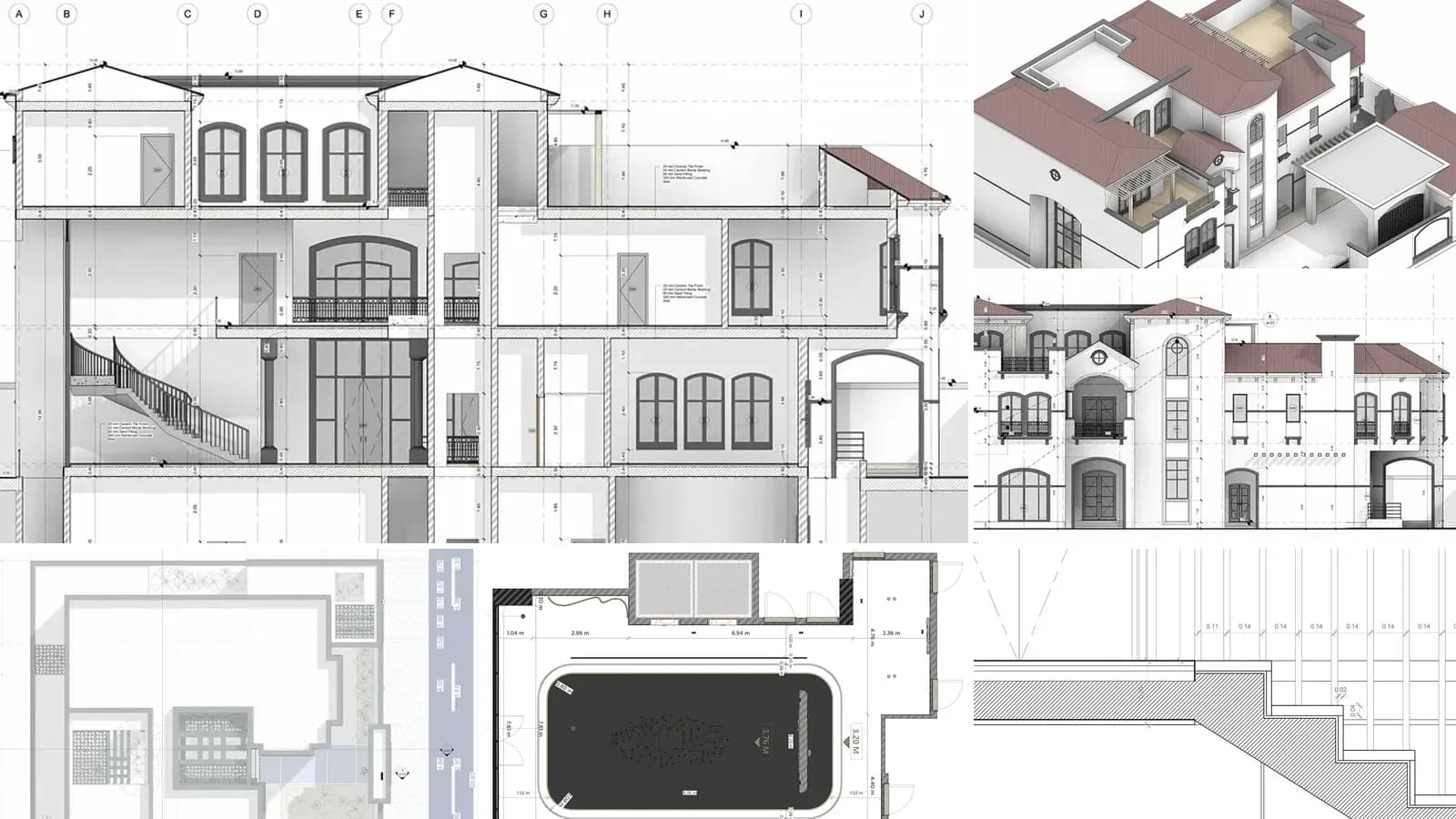
Architectural drawings are the scaled, measured drawings that describe a building well enough for someone else to approve it, price it and build it. They show where the building sits on its site, the layout of every floor, what each facade looks like, how the building is put together inside, and what each door, window and finish is. They come as a numbered set of sheets, and the same set does three jobs: it gets the building permit, it lets contractors bid, and it is what the crew builds from.
Our articles are still written by humans!
Get human written articles in your Google feed.
This guide goes through the 12 types you will find in a real drawing set, each with an example from a published project. It also covers the scales US architects use, what sheet numbers like A-101 mean, which drawings each project phase produces and how to read a set you have never seen before. We drew four of the examples ourselves, straight from a BIM model our AI generated. That is also the quickest way to see why one model can produce all of them.
The short version
- Four views do most of the work: plans look down, elevations look straight at a face, sections cut through, details zoom in. All 12 types.
- Sheet numbers are a map. A-101 is architectural, plan, sheet 1. A-301 is the first section. How a set is organized.
- The set grows with the project, from a few schematic sheets to a full construction set, then shop and as-built drawings. Drawings by phase.
- Today they are views of one model. We cut a plan, an elevation and a section from one IFC file to show it. One model, four drawings.
What are architectural drawings?
An architectural drawing is a technical drawing of a building, made to scale and to conventions every architect, engineer, plan reviewer and builder understands. The conventions matter more than the drawing skill. A wall cut by a plan is drawn with a heavy line, a door shows its swing as an arc, and a dashed line means something above you or hidden behind something else. A circle with a number over a sheet code points you to another drawing in the set. Anyone trained to read those conventions can find their way around a set from a different office, in a different city, made in different software.
Architectural drawings (definition): the set of scaled orthographic drawings, plus schedules and notes, by which an architect defines a building's location, layout, appearance, construction and materials for approval, pricing and construction.
Most architectural drawings are orthographic. They look at the building square-on, with no perspective, so a 10-foot wall measures the same at either end. That is what makes them buildable: you can take a dimension off the drawing and trust it. Perspective views and renders show what the building will feel like, but nobody builds from them.
The 12 types of architectural drawings
These are the drawings you will find in a typical architectural (A-series) set, with the scales US offices most often use. Metric projects use the nearest ratio: 1:100 or 1:50 for plans, 1:20 down to 1:5 for details.
| # | Drawing | What it shows | Typical US scale | Usual sheet |
|---|---|---|---|---|
| 1 | Site plan | The building on its lot: boundaries, setbacks, driveway, utilities, north | 1" = 20' or 1/16" = 1'-0" | A-001 or C-series |
| 2 | Floor plan | Each storey cut about 4 ft above the floor: walls, doors, windows, rooms, dimensions | 1/4" = 1'-0" (houses), 1/8" = 1'-0" | A-101 and up |
| 3 | Reflected ceiling plan | The ceiling as if mirrored onto the floor: heights, lights, grilles, soffits | Same as the floor plan | A-1xx |
| 4 | Roof plan | The roof from above: slopes, ridges, drains, equipment | 1/8" = 1'-0" | A-1xx |
| 5 | Exterior elevation | Each facade straight-on: heights, openings, materials | 1/4" or 1/8" = 1'-0" | A-201 and up |
| 6 | Interior elevation | One wall of a room: cabinets, tile, fixtures, mounting heights | 1/2" = 1'-0" | A-4xx or A-2xx |
| 7 | Building section | A vertical cut through the whole building: floor-to-floor heights, structure, roof | 1/4" or 1/8" = 1'-0" | A-301 and up |
| 8 | Wall section | A tall, narrow cut through one wall from foundation to roof, every layer labelled | 3/4" or 1" = 1'-0" | A-3xx |
| 9 | Details | Junctions drawn large: stair nosing, window head, roof edge, waterproofing | 1 1/2" or 3" = 1'-0" | A-501 and up |
| 10 | Enlarged plans | Kitchens, bathrooms, stairs at a larger scale than the main plan | 1/2" = 1'-0" | A-4xx |
| 11 | Schedules | Tables of every door, window, room and finish, keyed to the drawings | n/a | A-601 and up |
| 12 | 3D views | Axonometrics, isometrics, perspectives, used to explain rather than to measure | Not to scale | A-9xx or cover |
The sheet numbers in the last column follow the US National CAD Standard, explained below. Many offices number differently, but most sets you will see in the US look like this.
1. Site plan
The site plan places the building on its lot. It shows the property lines and the setbacks the zoning code requires, the footprint of the building, driveways, walks, parking, landscaping, utility connections and easements, and always a north arrow. Plan reviewers usually start with it, because a building that breaks a setback fails no matter how good the floor plans are. On larger projects the civil engineer draws the grading and utilities on C-sheets, and the architectural site plan only shows the building and what is around it.
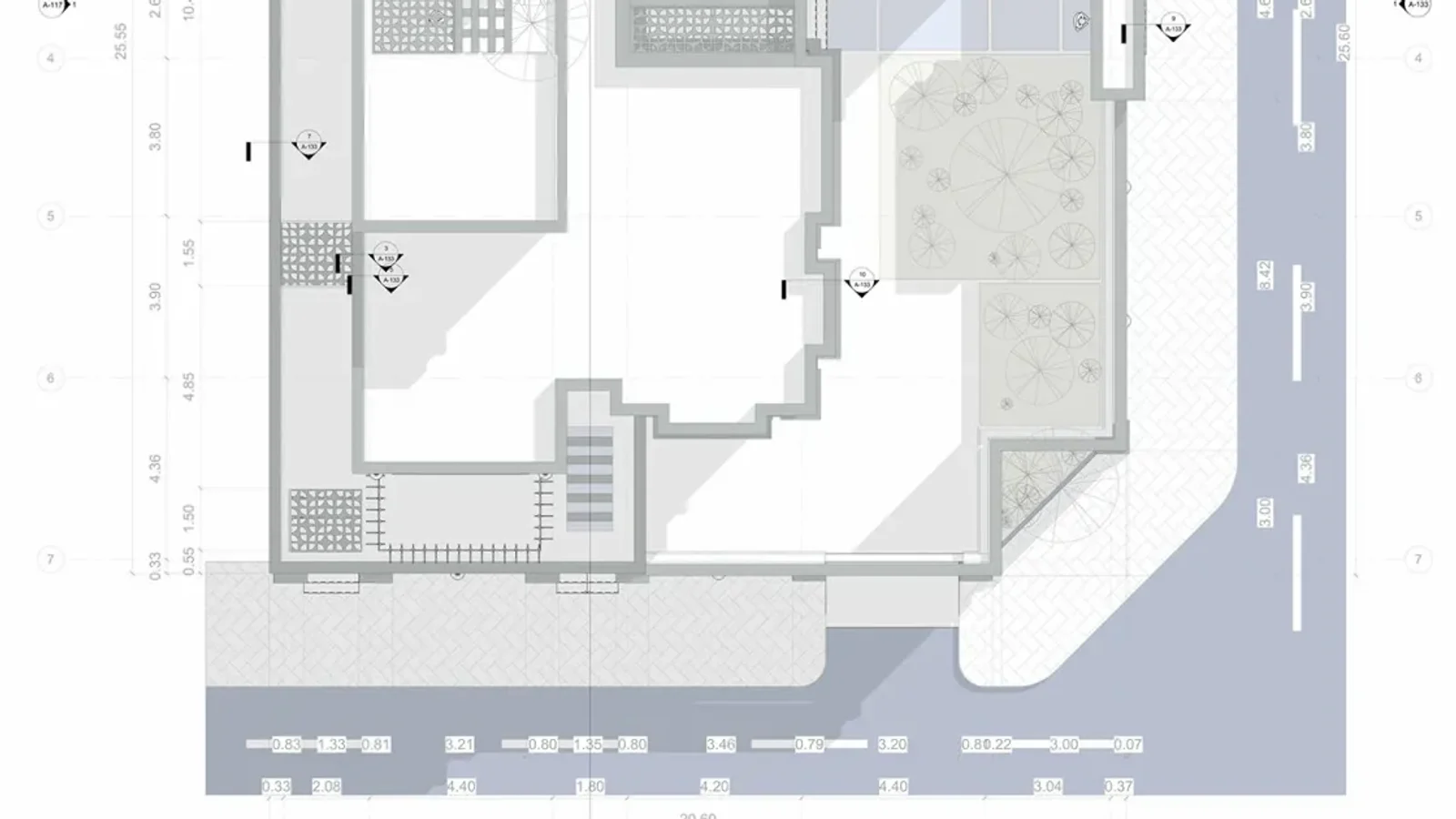
Part of a villa site plan at 1:50: the footprint, the planted courtyard, the paved edge and both streets, with dimensions tied to the grid lines. Reference: Architectural Technical drawing Package Villa by Mohamed Nasser on Behance.
2. Floor plan
A floor plan is a horizontal cut through one storey, conventionally about 4 feet (1.2 m) above the floor, looking down. The height is chosen so the cut passes through doors and windows. Everything the cut slices through, mostly walls, is drawn heavy. Everything below the cut, such as the floor, counters and stair treads, is drawn thinner. Things above the cut, like upper cabinets or a beam, are dashed. A construction floor plan adds grid lines, dimension strings, room names and numbers, door and window tags that point to the schedules, and section and elevation markers that point to other sheets.
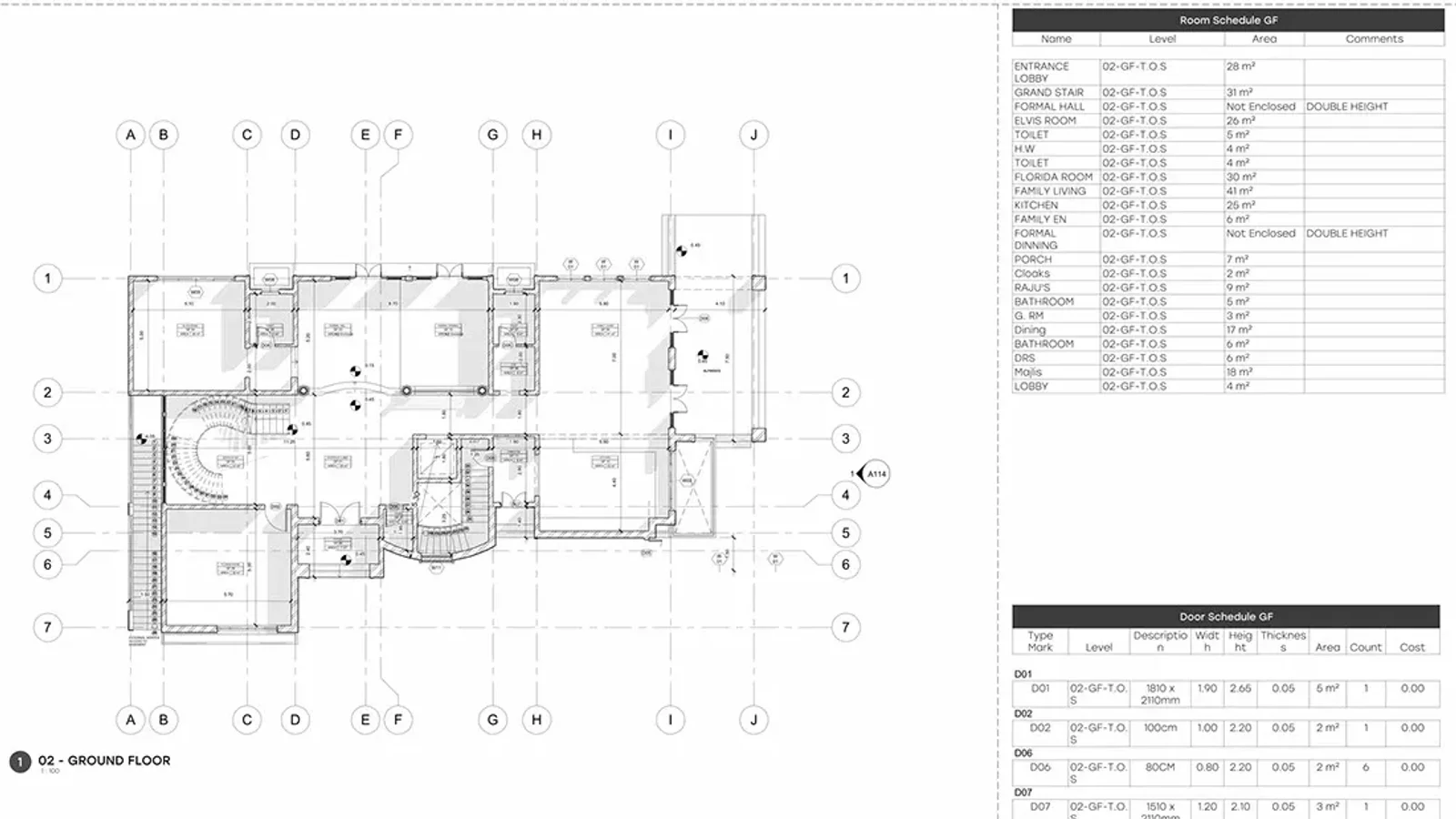
A ground floor plan at 1:100 with its grid (A to J, 1 to 7) and, beside it, the room schedule and the door schedule for the same floor. Reference: LB Villa, Architectural working drawing by Mohamed Fayed on Behance.
3. Reflected ceiling plan
A reflected ceiling plan (RCP) shows the ceiling as if the floor were a mirror, so it lines up exactly with the floor plan beneath it rather than being flipped. It carries ceiling heights, materials, light fixtures, sprinkler heads, air grilles and access panels. It is where the architect, the electrical engineer and the mechanical engineer have to agree, so a messy RCP usually means coordination problems.
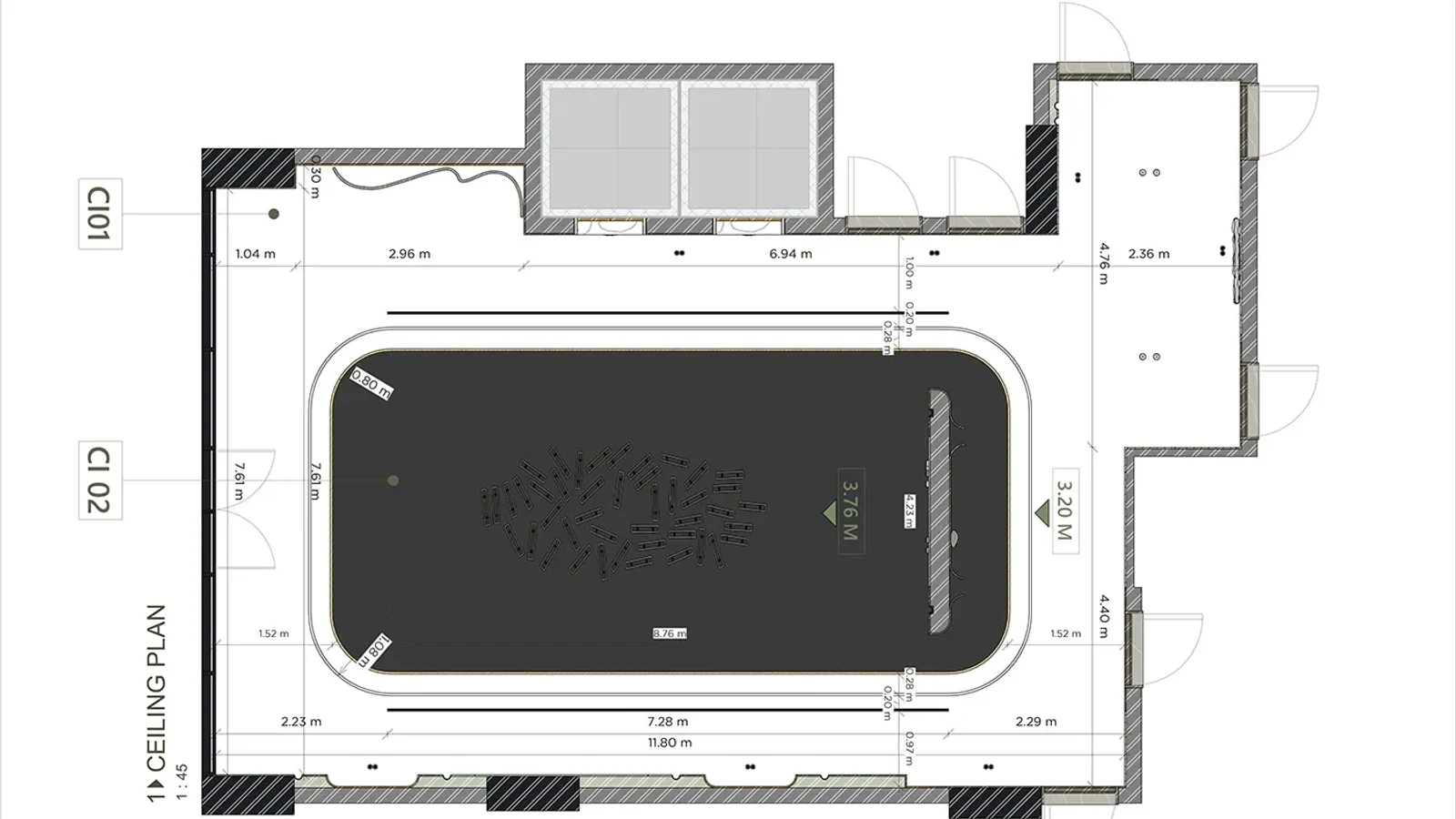
A reflected ceiling plan: two ceiling finishes (tagged CI01 and CI02 and keyed to a legend), two ceiling heights and the light positions, all dimensioned from the walls. Reference: Riyadh Hotel Reception, Interior Shop Drawings by Astro Architects on Behance.
4. Roof plan
The roof plan is the building seen from directly above. It shows slopes with arrows and pitch, ridges, valleys and hips, gutters and drains, parapets, skylights and rooftop equipment. On a flat roof it is mostly about drainage: where the water goes and how the insulation is tapered to get it there.
5. Exterior elevations
An elevation is a straight-on view of one face of the building, with no perspective, named either by direction (North elevation) or by a number keyed on the plan. It shows the overall height, the floor levels as datum lines, every door and window, and the material of each surface, usually with notes calling them out. Elevations are also what most design review boards and homeowners' associations look at, because they are the closest a technical drawing gets to "what will it look like".
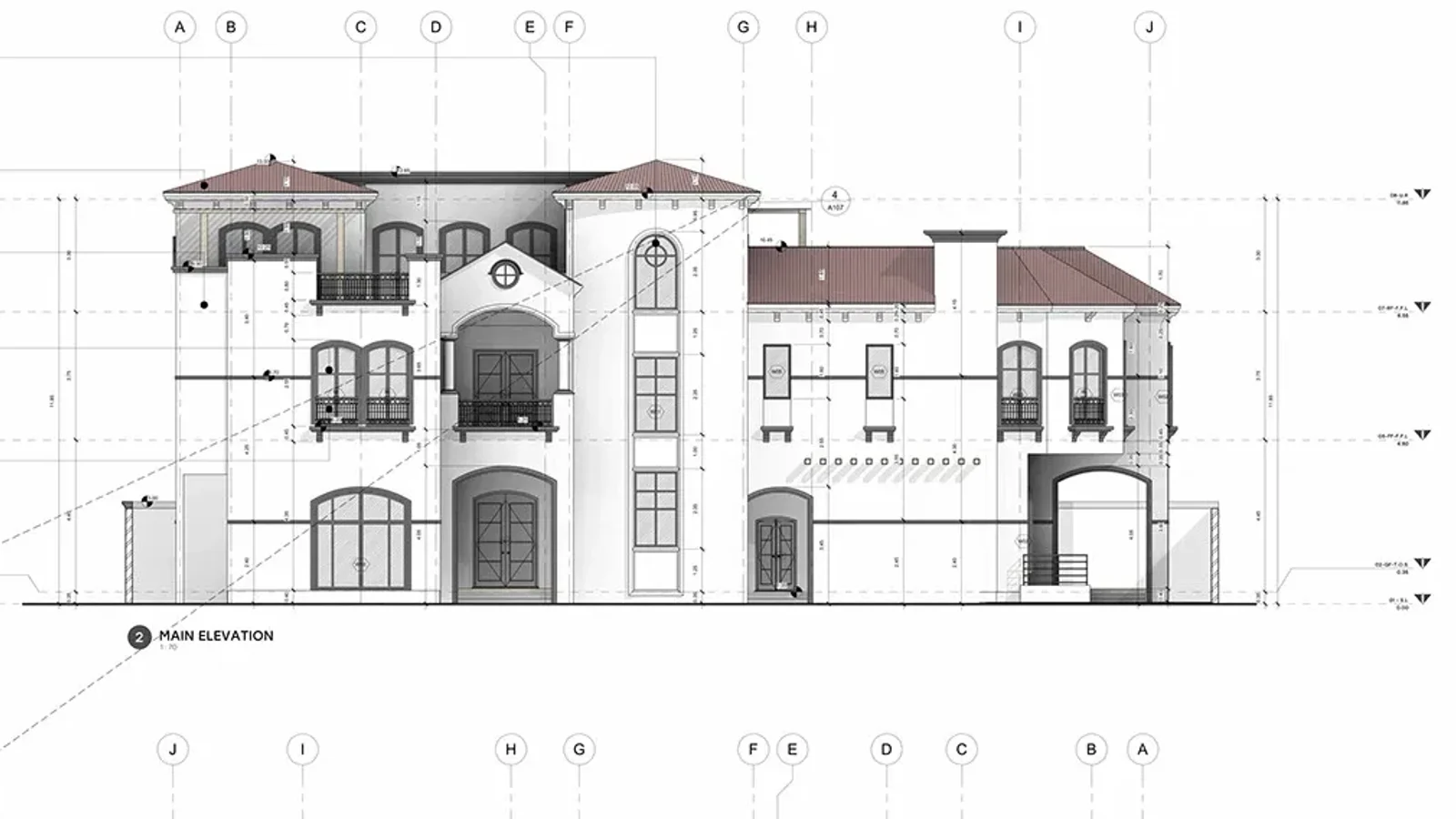
The main elevation of the same villa: grid bubbles along the top tie it back to the plan, and the level markers at each side give the floor and roof heights. Reference: LB Villa, Architectural working drawing by Mohamed Fayed on Behance.
6. Interior elevations
Interior elevations do for one wall of a room what exterior elevations do for a facade: cabinets, shelving, tile layouts, mirrors, fixtures and the mounting height of everything. Kitchens and bathrooms always get them, because that is where a few inches matter most.
7. Building sections
A building section is a vertical cut through the whole building, like slicing a cake, marked on the plans with a section line and a pair of arrows showing which way you are looking. It shows what no plan or elevation can: floor-to-floor heights, ceiling heights, the thickness of each floor, how the stairs climb, where the structure is, and how the roof meets the walls. As in a plan, what the cut slices through is drawn heavy and what you see beyond it is drawn light.
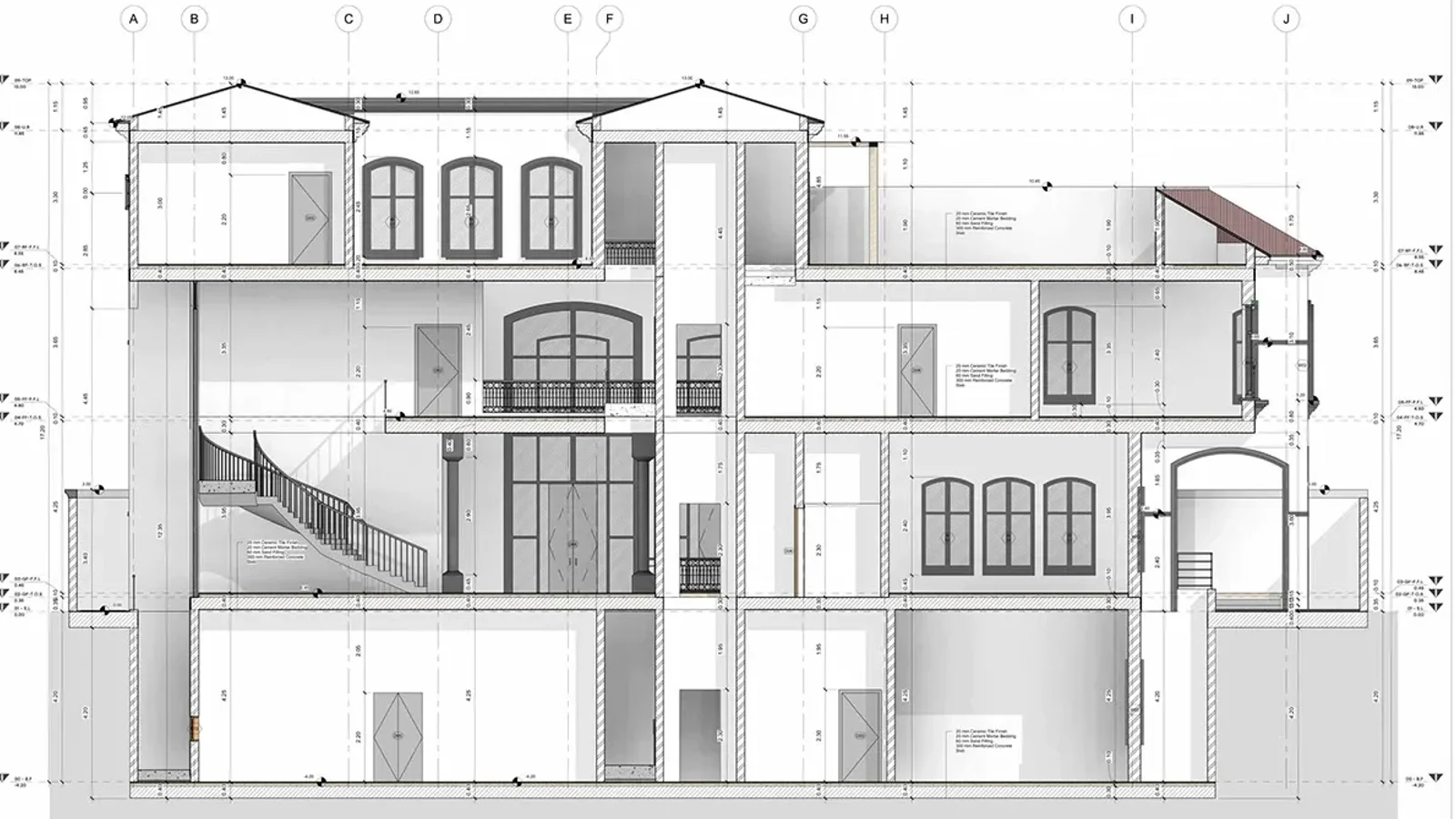
A section cut through a villa: basement, two floors, the rooftop rooms and the roof in one view, with every level marked. You can see the curved stair and the double-height windows, which neither the plan nor the elevation shows clearly. Reference: LB Villa, Architectural working drawing by Mohamed Fayed on Behance.
8. Wall sections
A wall section is a tall, narrow section through one exterior wall, from footing to roof, at a large scale. Every layer is drawn and labelled: foundation, slab, framing or masonry, sheathing, insulation, air and water barriers, cladding, and the window head and sill. It is where much of the building's energy and moisture performance is decided, which is why envelope consultants read it closely.
9. Details
Details are the junctions drawn large enough to build: a stair nosing, a window head, a roof edge, a threshold, a handrail fixing. A set can have dozens of them. Each is numbered and called out from the plan, section or elevation it belongs to, so the builder can go from "how does this corner work?" to the exact drawing that answers it.
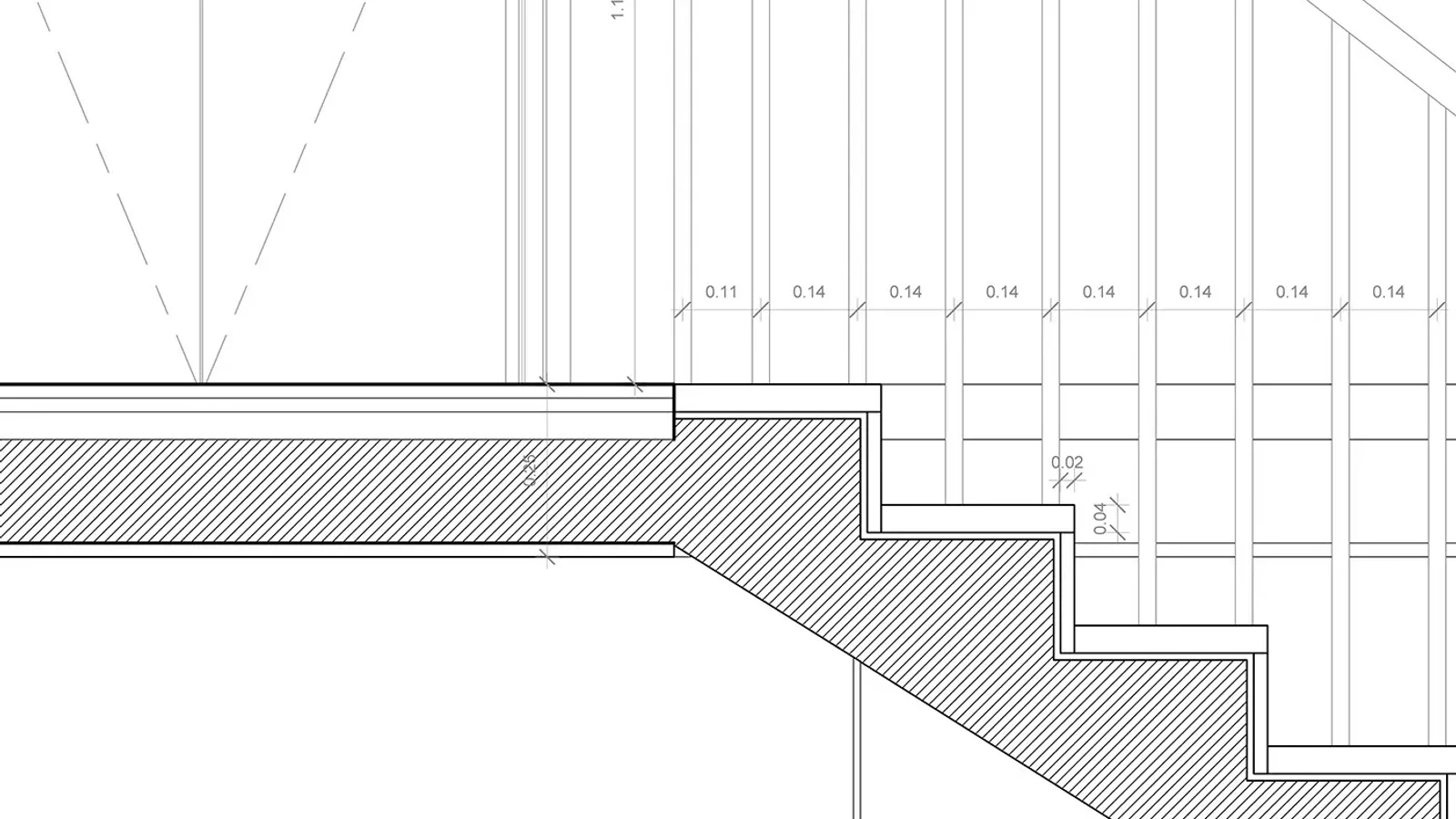
A stair detail: the hatched concrete, the finish layers, the nosing and the baluster spacing, each dimensioned so it can be built without guessing. Reference: Residential Villa Technical Set, KAITECH Project by Ahmed Selem on Behance.
10. Enlarged plans
Enlarged plans redraw the busy parts of a floor plan at a bigger scale: kitchens, bathrooms, stair cores, elevator lobbies. They carry the fixture positions, clearances and dimensions that would be unreadable at 1/8" = 1'-0", and they are where accessibility clearances get checked.
11. Schedules
Schedules are tables. The door schedule lists every door with its tag, size, type, material, fire rating and hardware. The window schedule does the same for windows. The room finish schedule gives the floor, base, wall and ceiling finish of every room. The tags on the plans (a door tag such as D07, say) point into these tables, which is why a change to a door means editing one row, not twenty drawings. In BIM software, schedules are read straight from the model, so they cannot drift out of step with the plans.
12. 3D views
Axonometrics, isometrics, exploded views and perspectives explain how the pieces fit, especially on stairs, complex roofs and assemblies. They usually sit on the cover sheet or next to the plans they explain. They are rarely dimensioned and are not meant to be measured. See our own example of an axonometric below.
How a set of architectural drawings is organized
A drawing set is not a pile of sheets. It is ordered so you can find any drawing from any other one. Most US offices use, or loosely follow, the Uniform Drawing System in the United States National CAD Standard (NCS), published by the National Institute of Building Sciences. A sheet number like A-101 has three parts:
| Part | Meaning | Common values |
|---|---|---|
| Discipline letter | Who drew it | G general, C civil, L landscape, S structural, A architectural, I interiors, F fire protection, P plumbing, M mechanical, E electrical, T telecommunications |
| First digit | Sheet type | 0 general (symbols, notes), 1 plans, 2 elevations, 3 sections, 4 large-scale views, 5 details, 6 schedules and diagrams, 9 3D views |
| Last two digits | Sequence | 01, 02, 03... in a logical order, often by floor |
So A-101 is the first architectural plan sheet, A-201 the first elevation sheet, A-301 the first section sheet, A-501 the first sheet of details and S-101 the first structural plan.
Not every office uses those digits. The villa used for several examples in this article simply numbers its sheets in sequence, but in the same order. Its sheet list runs: A100 cover, A101 site and location plan, A102 area calculation, A103 basement, A104 ground floor plan, A105 first floor plan, A106 roof plan, A107 and A108 elevations, A109 and A110 sections, A114 glazing calculation and A115 door and window schedule. The order is the same in most sets: the context first, then the plans from the bottom up, then the elevations, sections, details and schedules.
Every sheet also has a title block, usually down the right side or along the bottom. It gives the project, the sheet title and number, the scale, the date, who drew and who checked it, and a revision table. When two people disagree about a drawing, the first question is which revision each of them is looking at.
Architectural drawings by project phase
The set does not appear all at once. In the US the phases are usually the ones in the AIA owner-architect agreement, and each phase produces a different kind of drawing:
| Phase | What the drawings are for | What is usually in the set |
|---|---|---|
| Schematic design (SD) | Agreeing the big moves with the client | Site plan, simple floor plans, massing views, a few elevations, area tables |
| Design development (DD) | Fixing systems, sizes and materials | Dimensioned plans, all elevations, building sections, first wall sections, outline specs, engineers' layouts |
| Construction documents (CD) | Permit, bidding and construction | Everything in the table above, coordinated with structural and MEP sheets, plus the specifications |
| Permit set | Approval by the building department | The CD set, stamped, with code analysis and energy compliance sheets |
| Shop drawings | How a fabricator will make one part | Drawn by the contractor or supplier (stairs, steel, windows, millwork), reviewed by the architect |
| Record (as-built) drawings | What was actually built | The CD set updated with the contractor's field changes after construction |
Each step adds sheets. A schematic design for a house fits on a handful of sheets; its construction set, with the engineers' drawings, runs to dozens.
Architectural drawings vs construction drawings vs blueprints
These three terms get mixed up all the time, including by people in the industry:
- Architectural drawings are the architect's sheets, the A-series: plans, elevations, sections, details and schedules.
- Construction drawings, or construction documents, are the whole coordinated package used to permit, bid and build: architectural drawings plus civil, structural, mechanical, electrical and plumbing drawings and the written specifications.
- Blueprints are, strictly, copies made with the cyanotype process John Herschel introduced in 1842: white lines on blue paper. The process was replaced by diazo whiteprints and then by plotters and PDFs, but "blueprints" has stuck as the everyday word for any set of building plans.
So "what are architectural blueprints?" has a simple answer: architectural drawings, in an old word.
How to read architectural drawings
If you have a set in front of you for the first time, read it in this order:
- Cover and G-sheets first. The sheet index tells you what exists. The symbols and abbreviations sheet tells you what the marks mean in this office.
- Check the scale and north arrow on every sheet. Sheets are rarely all at one scale, and a drawing marked "not to scale" means exactly that. Use the written dimensions, never a ruler on a print.
- Read the plans, using the grid. The lettered and numbered grid lines (A, B, C across; 1, 2, 3 down) run through every plan, elevation and section. "Grid C/4" means the same point on every sheet.
- Follow the markers. A circle split in two, with 3 over A-301, means "drawing 3 on sheet A-301". Section markers add an arrow for the direction you look. Elevation markers on the plan point at the face being drawn. Door and window tags point into the schedules.
- Read the line weights. Heavy lines are what the plan or section cuts through. Medium lines are edges seen below or beyond. Dashed lines are hidden or above. Hatching marks a material: concrete, masonry, insulation, earth.
- Look for the clouds. A cloud drawn around part of a drawing, with a triangle and a number, marks a change in that revision. Check it against the revision table in the title block.
This walkthrough of a complete residential set, by 30X40 Design Workshop, shows how plans, schedules and specifications work together on a real project:
What's in my set of architectural documents? Sharing everything: drawings, schedules, + specs., by 30X40 Design Workshop on YouTube, 19 minutes 16 seconds. The player only loads when you press play.
One model, four drawings: how BIM produces them
Plans, elevations and sections used to be drawn separately, so changing one meant redrawing the others, and the mismatches between them were a big source of site problems. In BIM software they are no longer separate drawings. They are views of one 3D model. A plan is a horizontal cut through the model, a section is a vertical cut, an elevation is the model seen square-on, and a schedule is a table read from it. Move a wall and every view moves with it.
To show this is not just marketing, we took one IFC4 model our AI engine produced, a single-storey house of 113 m² (about 1,217 sq ft), and drew four views from it with a short Python script. The plan and the section are real cuts: every triangle of every wall, slab, door and window is sliced by the cut plane, and the cut edges are rebuilt into the black shapes you see. The grid lines, dimensions, door swings and level markers are placed from the model's own coordinates too. Nothing was drawn by hand.
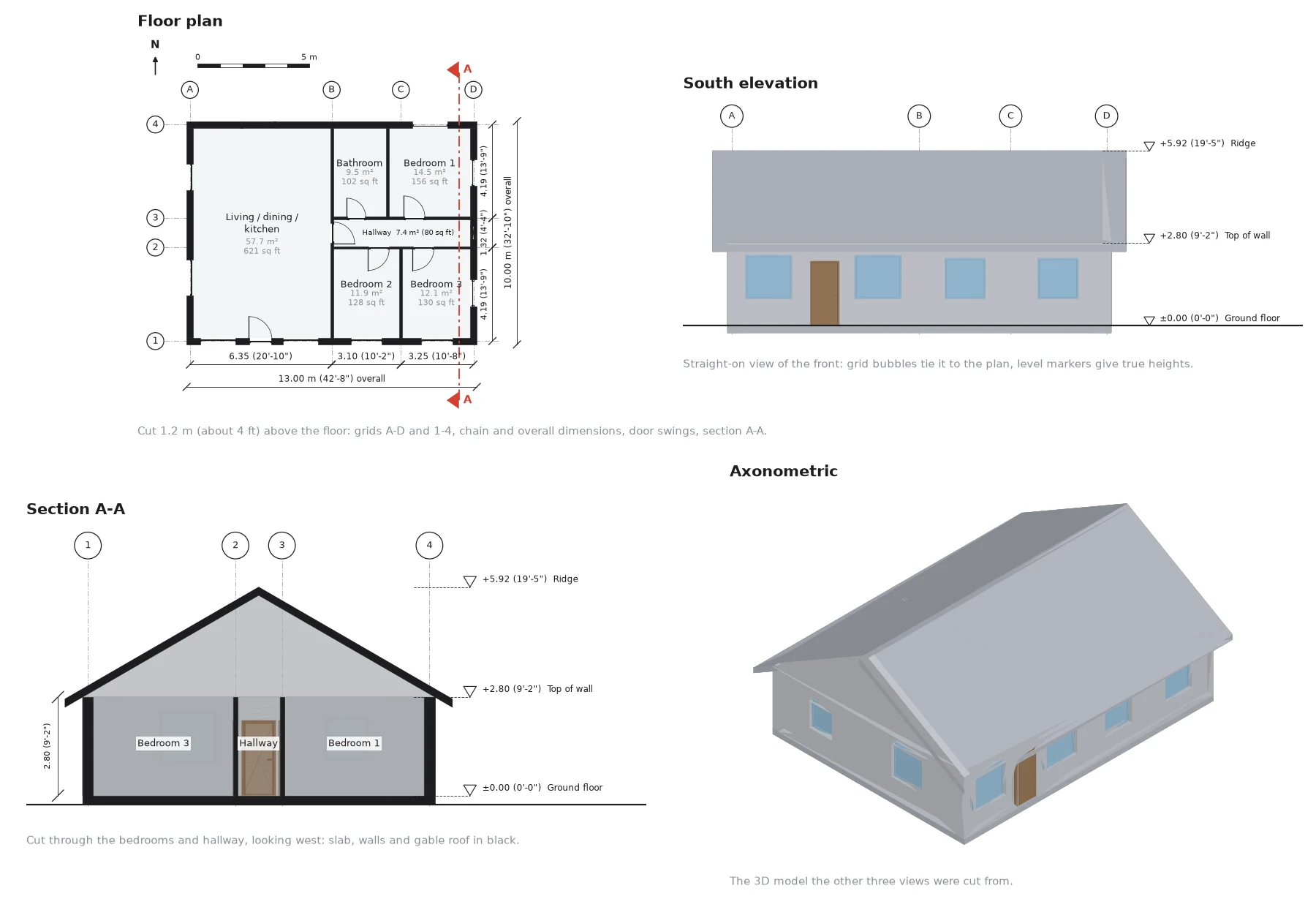
One IFC file, four drawings: a plan cut 1.2 m (about 4 ft) above the floor, the south elevation, section A-A along the red line, and an axonometric. The same grid bubbles appear in the plan, elevation and section, which is how you find one point across sheets. Room names and areas come from the model's IfcSpace entities: 113.1 m², or about 1,217 sq ft.
What this does not give you is everything a construction set needs. There are no door and window tags, no material hatching, no notes and no title block, and the house is a schematic-level model: its walls are single solids, so there are no layers to show in a wall section. The office-grade drawings earlier in this article still take an architect hours of annotation per sheet. Getting the model right is the part a tool can speed up most. If you want to see how an IFC model is structured inside, we opened one line by line here.
Start from a model, not a blank sheet
- From brief to BIM. Describe the building and the site; AIBIMTool generates the room program, the massing and an editable IFC4 model.
- Plans per storey. Every storey gets a 2D floor plan cut 1.2 m above the floor, with rooms, areas and doors, the same convention as in this guide.
- Take it into Revit, Archicad or Rhino through IFC and produce the full drawing set there.
How we made this guide
The four-drawing figure was generated on 25 October 2026 from an IFC4 file exported by the AIBIMTool engine (a 13 by 10 m single-storey house, 113.1 m² of rooms), read with IfcOpenShell 0.9.0. The plan and section were cut from the triangulated geometry with shapely, and all four views were drawn with matplotlib, using a script we wrote for this article.
The other drawings are published work by architects and students on Behance, credited under each image. We cropped them to fit the page and left out their title blocks; the drawings themselves are unedited. They illustrate each drawing type; they were not produced with our tool.
The scales and sheet types are common US practice, not a rule every office follows. Check your own office standard or the client's CAD manual before you number a set.
Sources
- United States National CAD Standard, Version 6, National Institute of Building Sciences: the Uniform Drawing System behind A-101 style sheet numbers.
- Architectural drawing, Wikipedia: drawing types, conventions and history.
- Blueprint, Wikipedia: the cyanotype process introduced by John Herschel in 1842 and what replaced it.
- Shop drawing, Wikipedia and As-built drawing, Wikipedia.
- 30X40 Design Workshop, What's in my set of architectural documents? (YouTube, 2021).
Frequently asked questions
What are architectural drawings?
Architectural drawings are the scaled, measured drawings an architect uses to describe a building: its position on the site, the layout of every floor, how it looks from outside, how it is built inside and what each part is made of. They are organised as a numbered set of sheets, usually starting with A for architectural, and the same set is used to get a building permit, price the work and build it.
What are the main types of architectural drawings?
The core types are the site plan, floor plans, reflected ceiling plans, roof plans, exterior and interior elevations, building and wall sections, details, schedules and 3D views such as axonometrics. A complete construction set adds structural, mechanical, electrical and plumbing drawings from the engineers, and later the contractor's shop drawings and the record (as-built) drawings.
What is the difference between architectural drawings and construction drawings?
Architectural drawings are the architect's sheets, the A-series. Construction drawings, or construction documents, are the whole coordinated package used to permit, bid and build the project: the architectural drawings plus civil, structural, mechanical, electrical and plumbing drawings and the written specifications. Every architectural drawing in a CD set is a construction drawing, but not the other way round.
Are architectural blueprints the same as architectural drawings?
In everyday speech, yes. A blueprint was originally a copy made with the cyanotype process John Herschel introduced in 1842, which printed white lines on a blue background. The process has been obsolete for decades, replaced by diazo whiteprints and then plotters and PDFs, but people still call any set of building plans blueprints.
What scale are architectural drawings in the US?
US architects use imperial architectural scales. Floor plans of houses are usually 1/4 inch = 1 foot (1:48), larger buildings 1/8 inch = 1 foot (1:96). Wall sections are often 3/4 inch or 1 inch = 1 foot, details 1 1/2 or 3 inches = 1 foot, and site plans use engineering scales such as 1 inch = 20 feet. Metric projects use 1:50 and 1:100 for plans, 1:5 to 1:20 for details.
What do sheet numbers like A-101 mean?
Under the Uniform Drawing System in the US National CAD Standard, the letter is the discipline (A architectural, S structural, M mechanical, E electrical, P plumbing), the first digit is the sheet type (1 plans, 2 elevations, 3 sections, 4 large-scale views, 5 details, 6 schedules) and the last two digits count the sheets. A-101 is the first architectural plan sheet, A-301 the first architectural section sheet.
How do you read architectural drawings?
Start with the cover sheet and the G-series for the sheet index, symbols and abbreviations. Check the scale and north arrow on each sheet, then read the plans first, using grid lines to find your place. Section and elevation markers on the plans tell you which other sheet shows that cut or view: a bubble reading 3 over A-301 means drawing 3 on sheet A-301. Heavy lines are cut elements, thin lines are things seen beyond.
Can architectural drawings be generated from a BIM model?
Yes, and that is how most of them are produced today. In Revit, Archicad or any BIM tool, plans, sections and elevations are live views of one 3D model, and schedules are tables read from it, so a change to a wall updates every sheet. The four drawings in this article were cut by a short script straight from an IFC model our AI engine generated.








How to Connect Claude to Revit: The 3 Revit MCP Servers, Set Up Step by Step
Connect Claude to Autodesk Revit with MCP: Autodesk's official Revit 2027 server, the open-source mcp-servers-for-revit for Revit 2020 to 2026, and the pyRevit route, with exact configs, prompts and pitfalls. Plus the no-setup alternative: AIBIMTool, Claude-powered BIM modelling online with a free plan.
How to Connect Claude to Rhino for BIM: Rhino MCP, Grasshopper and IFC
Connect Claude to Rhino with McNeel's official Rhino MCP Platform or rhinomcp, step by step, then get a real BIM model into Rhino: VisualARQ, a free IFC-to-3dm script we tested on an AIBIMTool building, and prompts for BIM work in Rhino and Grasshopper.
LOD in BIM: Level of Development 100 to 500, Explained with Real Models
LOD in BIM is the Level of Development of each model element, from LOD 100 to 500. What every level means in the 2025 BIMForum spec, LOD vs level of detail and LOIN, and the LOD our own AI-generated models reach.