
Revit for Mac in 2026: What Autodesk Supports, What It Costs and What Breaks

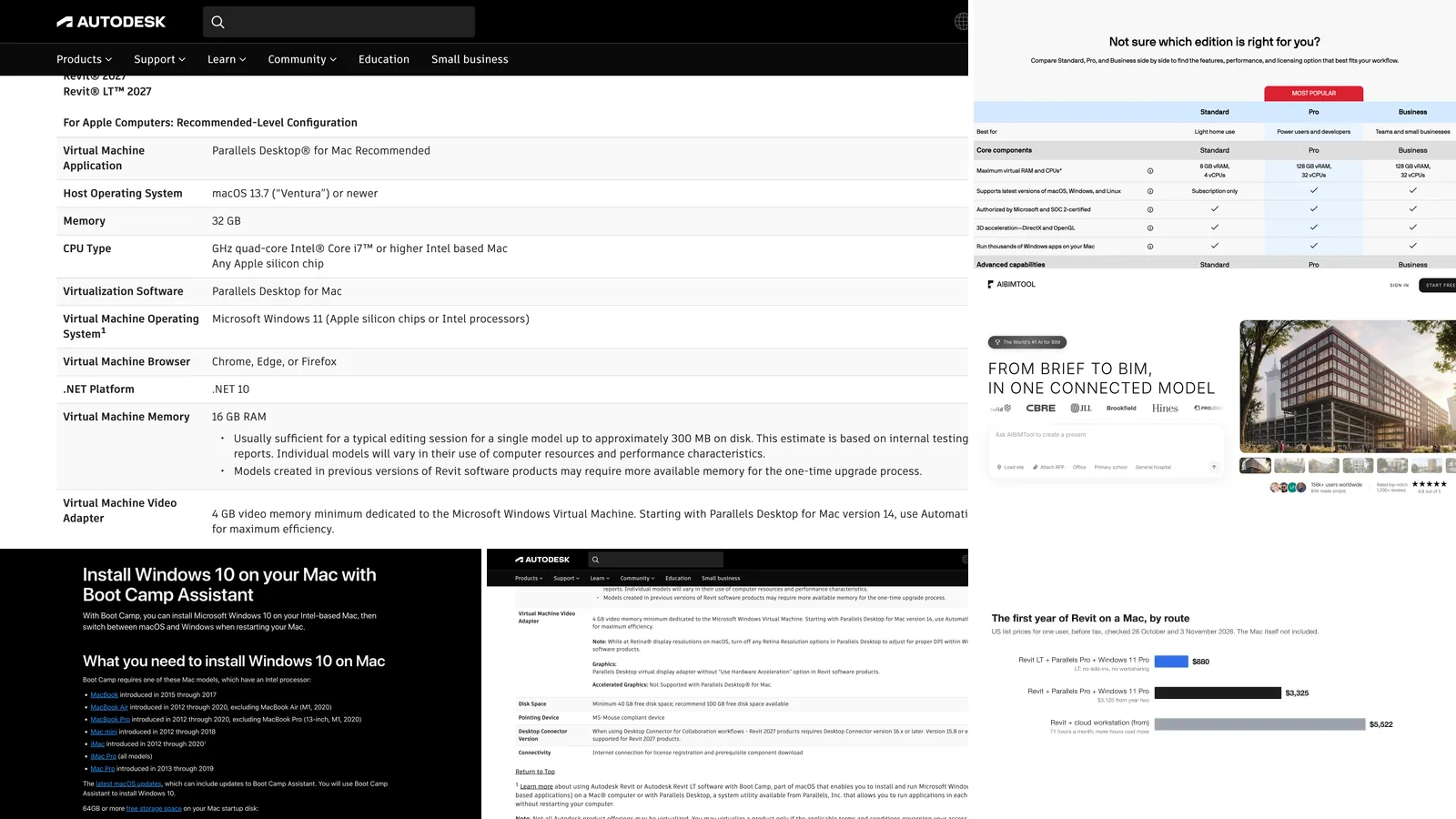
There is no Revit for Mac, and Autodesk says it is not planning one. Revit runs only on Windows. On a Mac you run Windows and put Revit inside it, and the one way Autodesk itself recommends is Parallels Desktop on a Mac with 32 GB of memory, giving 16 GB to Windows. Two details most guides leave out: that rules out Parallels' cheapest edition, which caps Windows at 8 GB, and Boot Camp, the old free route, does not exist on any Mac sold since 2020. We checked every route on Autodesk's, Apple's and Parallels' own pages on 3 November 2026.
Our articles are still written by humans!
Get human written articles in your Google feed.
On a Mac and only need the first BIM model? Skip Windows
- AIBIMTool runs in the browser, including Safari on any Mac. Nothing to install, no Windows.
- Describe the building and load the site: the AI models storeys, walls, slabs, doors, stairs and named rooms.
- The result is IFC4 and opens in Revit, so whoever has Revit on Windows can carry on from it.
We make AIBIMTool, so read what we say about it with that in mind. Everything about Revit, Parallels and Boot Camp comes from Autodesk, Parallels and Apple and is linked at the end.
The short version
- Apple silicon Mac (M1 to M4) with 32 GB or more: Parallels Desktop Pro with Windows 11. Autodesk's recommended route. Setup.
- Mac with 16 GB: works for learning and small models only. For real projects use a cloud workstation. Why.
- Intel Mac: Parallels Desktop 26, or Boot Camp for older Revit versions. The catch.
- Only need to look at an RVT file: Autodesk Viewer in the browser. How.
- Want to stay on macOS: Archicad, Vectorworks or BricsCAD BIM, plus IFC to talk to Revit users. Alternatives.
Key facts about Revit on a Mac (3 November 2026)
- Revit has no macOS version. Revit 2027 lists 64-bit Windows 11 as its only operating system, on an Intel or AMD processor.
- Autodesk's Revit team has said it is not planning a native Mac version. Its reason, as quoted on Autodesk's forums: the time needed for a good Mac version would slow features and fixes for the Windows product.
- Autodesk recommends Parallels Desktop for Mac in its Revit 2027 system requirements, with any Apple silicon chip or a quad-core Intel Core i7, macOS 13.7 Ventura or newer, 32 GB of memory on the Mac and 16 GB for Windows.
- In Parallels, Autodesk says to switch off Revit's hardware acceleration, and Accelerated Graphics is not supported.
- Parallels Desktop Standard caps a virtual machine at 8 GB of RAM and 4 CPUs, so Revit at Autodesk's settings needs Pro ($119.99 a year list price).
- Boot Camp works only on Intel Macs from 2012 to 2020, and Apple's instructions are for Windows 10.
- Parallels Desktop 27 runs only on Apple silicon. Intel Macs stay on Parallels Desktop 26.
Does Revit work on a Mac?
Not on its own. Revit is a Windows program built on Windows-only parts (.NET 10 and DirectX 11 in Revit 2027), and there is no download for macOS. What does work is running Windows on, or for, the Mac and installing the normal Windows Revit inside it. There are four ways to do that:
| Route | Which Macs | What it costs on top of Revit | Best for |
|---|---|---|---|
| Parallels Desktop (virtual machine) | Apple silicon, and Intel with version 26 | $119.99 a year (Pro) + a Windows 11 licence | Daily work on small and mid-size models |
| Cloud workstation (rented Windows PC streamed to the Mac) | Any Mac, any memory | Pay by the hour, roughly $2,500 a year and up | Large models, rendering, 16 GB Macs |
| Remote access to a Windows PC you already own | Any Mac | Nothing extra if the PC exists | Occasional edits from home |
| Boot Camp (Windows instead of macOS at start-up) | Intel Macs from 2012 to 2020 only | A Windows licence | Older Revit versions on older Macs |
Compatibility layers such as CrossOver, which run some Windows programs without Windows itself, are not on this list: Autodesk's requirements name only a full Windows 11, on a PC or in Parallels.
Revit on Apple silicon with Parallels: what Autodesk recommends
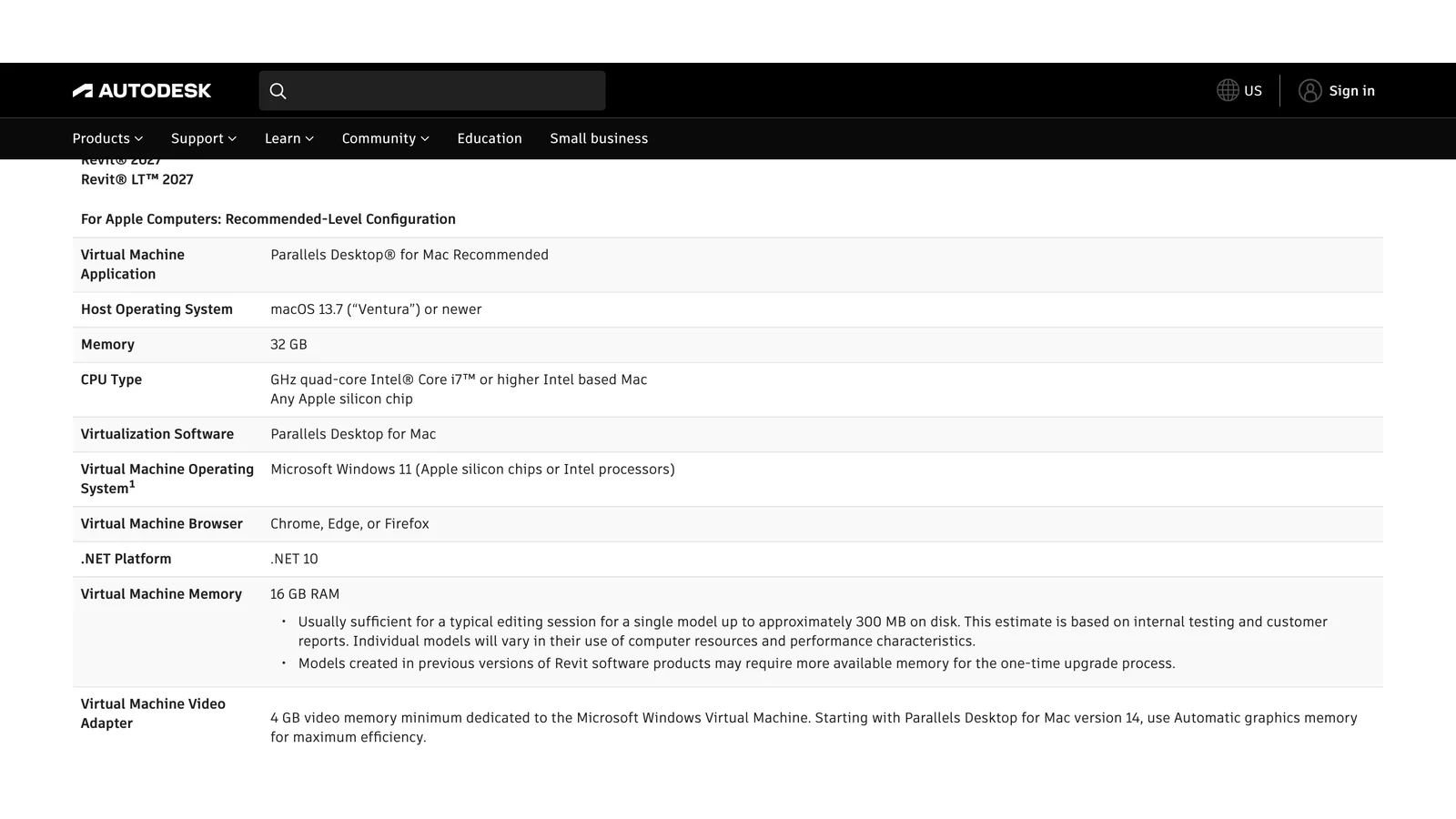
Autodesk's own configuration for running Revit 2027 and Revit LT 2027 on a Mac, from its system requirements page on 3 November 2026.
This table is the closest thing to official support that Revit on a Mac has. Read it as Autodesk does: the page also says that information on virtualised use is offered "as is", and that if you virtualise, you take on the risk of incompatibilities. In practice that means Autodesk support will help with Revit, not with Parallels.
Set it up the way Autodesk describes:
- Check the Mac. Apple silicon (any M chip) or a quad-core Intel Core i7, macOS 13.7 or newer, 32 GB of memory and at least 40 GB of free disk (100 GB recommended).
- Install Parallels Desktop Pro and let it download Windows 11. On Apple silicon this is Windows 11 for Arm, which runs Intel and AMD programs such as Revit through Microsoft's built-in emulation. Activate it with a Windows licence: Windows 11 Pro costs $199.99 on Microsoft's US store.
- Give Windows 16 GB of memory in the virtual machine's settings, and leave graphics memory on Automatic.
- Turn off Retina resolution in Parallels' display settings, so Windows and Revit get the right scaling. Autodesk calls this out specifically.
- Install Revit from your Autodesk account inside Windows, as on any PC.
- In Revit, turn off "Use Hardware Acceleration" (Options, Graphics). Autodesk's configuration uses Parallels' virtual display adapter without it.
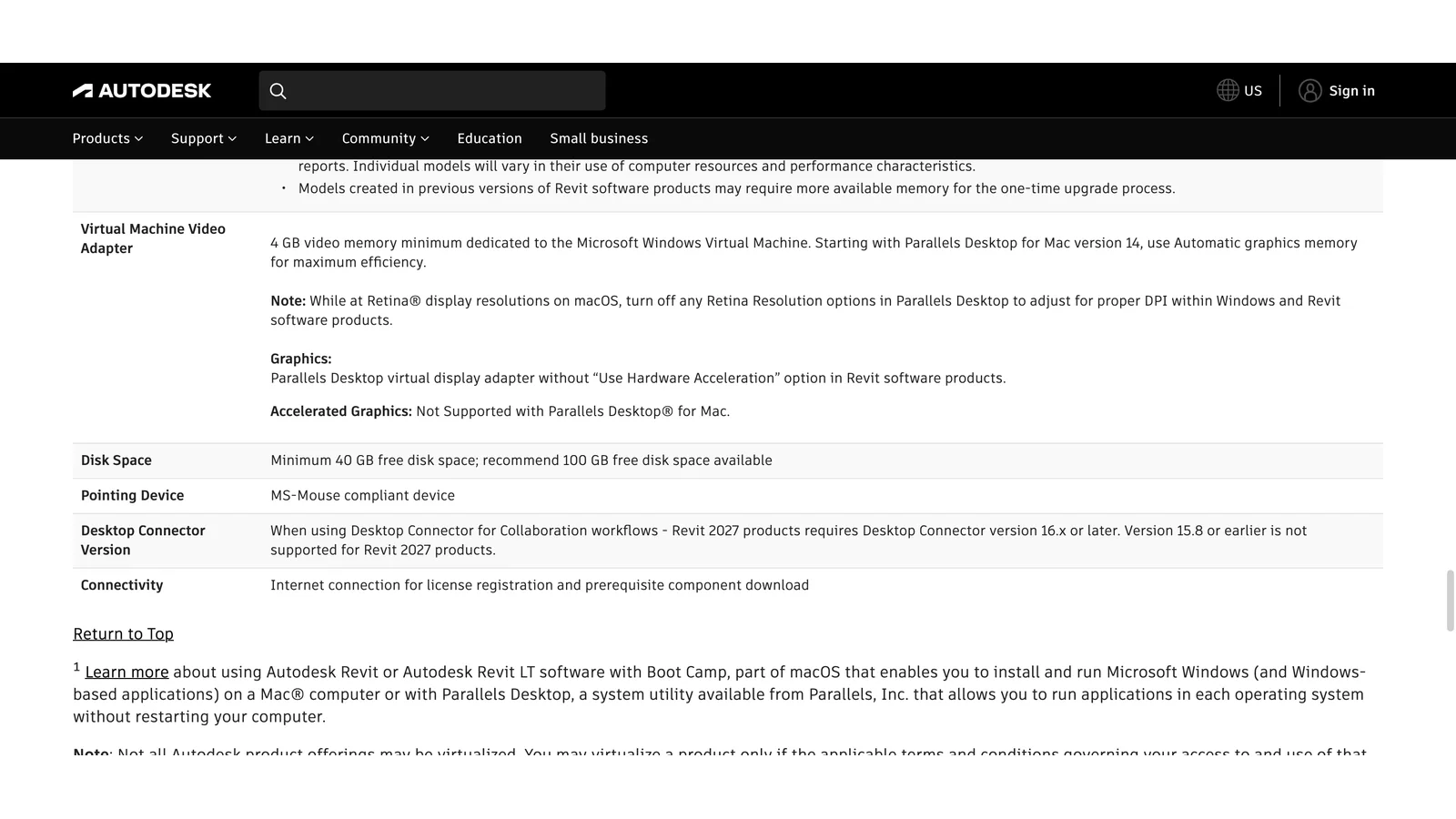
Graphics and disk in Autodesk's Mac configuration: hardware acceleration off, Accelerated Graphics not supported, 40 GB free disk at least.
What to expect. Parallels itself describes Revit in a virtual machine as good for most general modelling and weaker for heavy rendering, very large models and some add-ins. Not every add-in has been tested on Windows for Arm, so check the ones you depend on, especially licensing tools and rendering plug-ins, during the trial.
Which Parallels edition: Standard is not enough
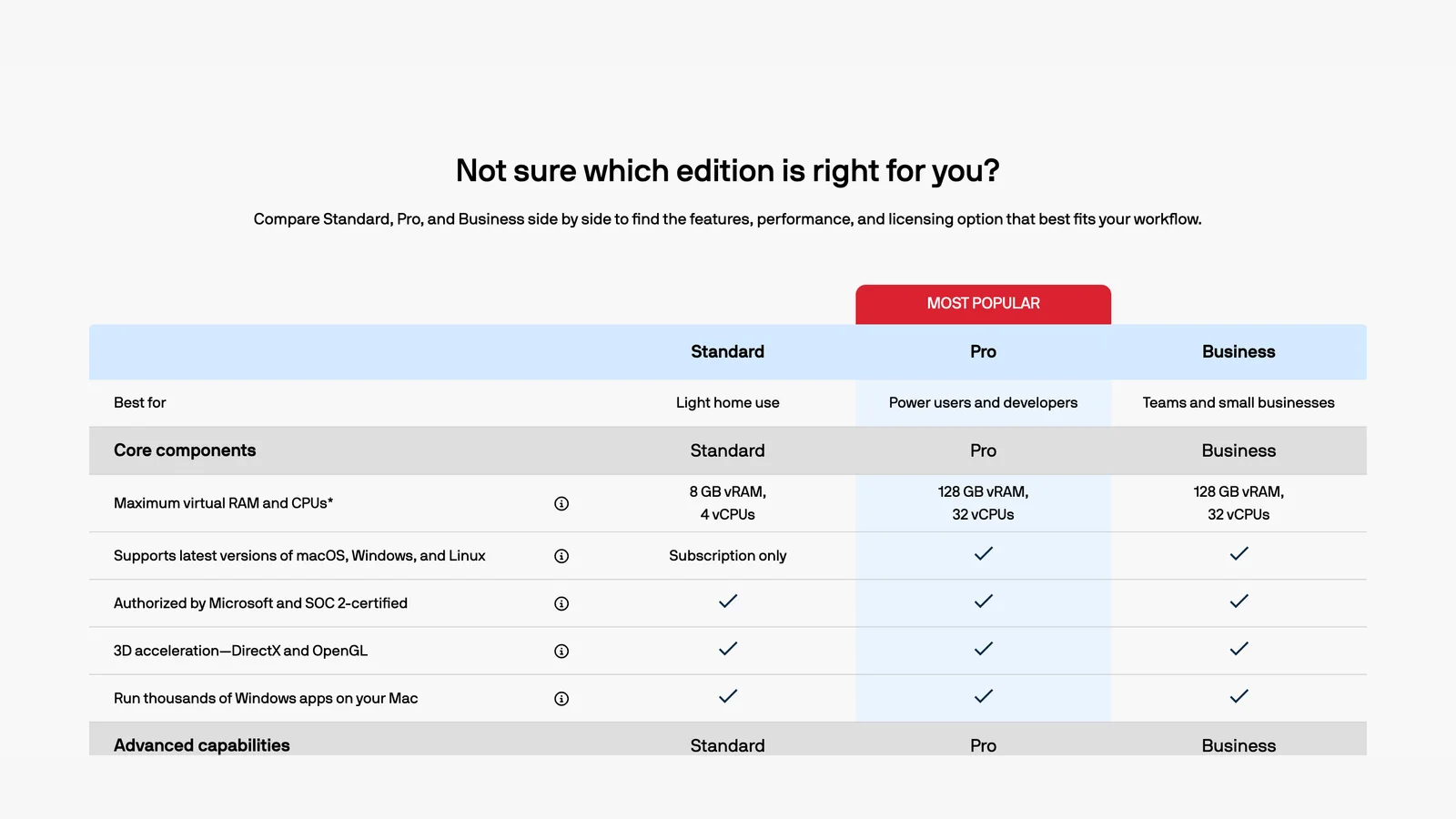
Parallels' own comparison on 3 November 2026: Standard stops at 8 GB of RAM and 4 CPUs for each virtual machine.
This is the detail most "Revit on Mac" guides get wrong. They quote Parallels' cheapest price, but Parallels Desktop Standard limits a virtual machine to 8 GB of memory, and Autodesk's configuration asks for 16 GB for Windows. To follow Autodesk's numbers you need Parallels Desktop Pro (up to 128 GB and 32 CPUs), at a list price of $119.99 a year. Pro and Business are subscription-only; only Standard can be bought once.
The same arithmetic applies to the Mac itself. Autodesk asks for 32 GB on the Mac because macOS needs its share while Windows has 16. On a 16 GB Mac, Windows realistically gets about 8 GB, half of what Autodesk says a 300 MB model needs. That is enough to learn Revit and work on small models, and not enough for a typical office project. If your Mac has 16 GB, a cloud workstation is the more honest route.
Revit on an Intel Mac: Boot Camp and its catch
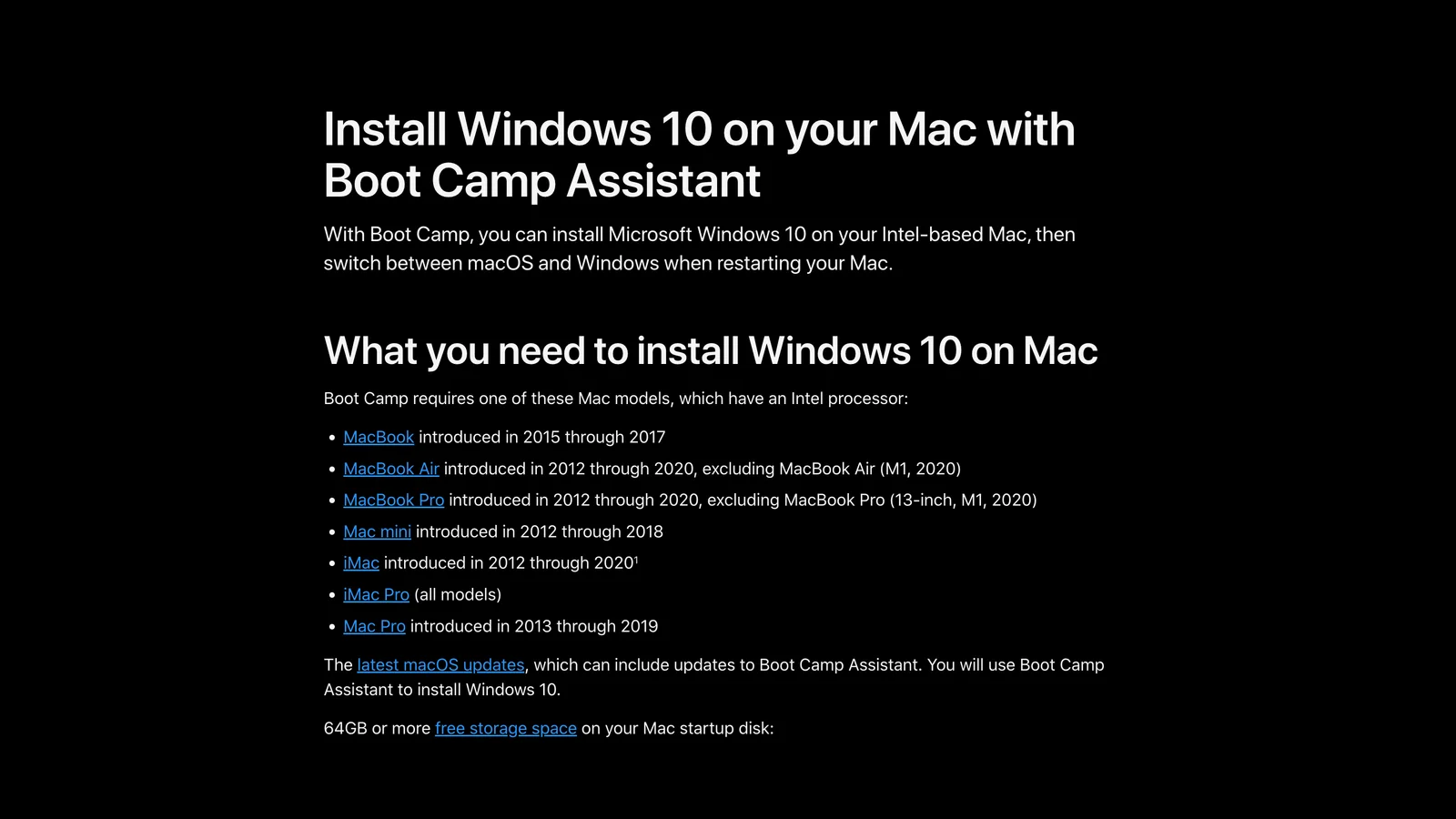
Apple's Boot Camp page on 3 November 2026: Intel Macs only, and the instructions are for Windows 10.
Boot Camp was the free way to run Revit on a Mac: the Mac starts in Windows instead of macOS and Revit gets the full hardware. It still works, with two limits:
- Intel Macs only. Apple lists Macs from 2012 to 2020 and excludes the first M1 models. No Apple silicon Mac can use Boot Camp.
- Apple's instructions are for Windows 10, while Revit 2027 lists Windows 11 only. Microsoft ended support for Windows 10 on 14 October 2025. So on Boot Camp you are realistically limited to older Revit versions, or to installing Windows 11 outside Apple's supported path.
On an Intel Mac, Parallels Desktop 26 is the other option, and Autodesk's configuration still includes Intel Macs. Parallels Desktop 27, the current version, requires Apple silicon.
Cloud workstations and remote access
A cloud workstation is a Windows PC with a proper graphics card in a data centre, streamed to your Mac in a browser or an app. Revit runs at full speed because nothing runs on the Mac, so memory and chip do not matter. The costs are an hourly bill, a dependence on your internet connection, and keeping project files somewhere the cloud PC can reach.
We did not test the providers, so here are the published numbers from one of them, Designair, which compared its plans with Vagon's in its own guide: for 71 hours a month (about 3.5 hours a working day) it put the cost at $209.75 to $298.50 a month, depending on the machine. Designair sells this service, so check the current price with each vendor.
Remote access to a Windows PC you already have, in the office or at home, costs nothing extra. It suits occasional edits. For 3D work, use a protocol designed for graphics (such as Parsec or Amazon DCV), because ordinary remote desktop tools lag in a 3D view.
What Revit on a Mac costs in the first year
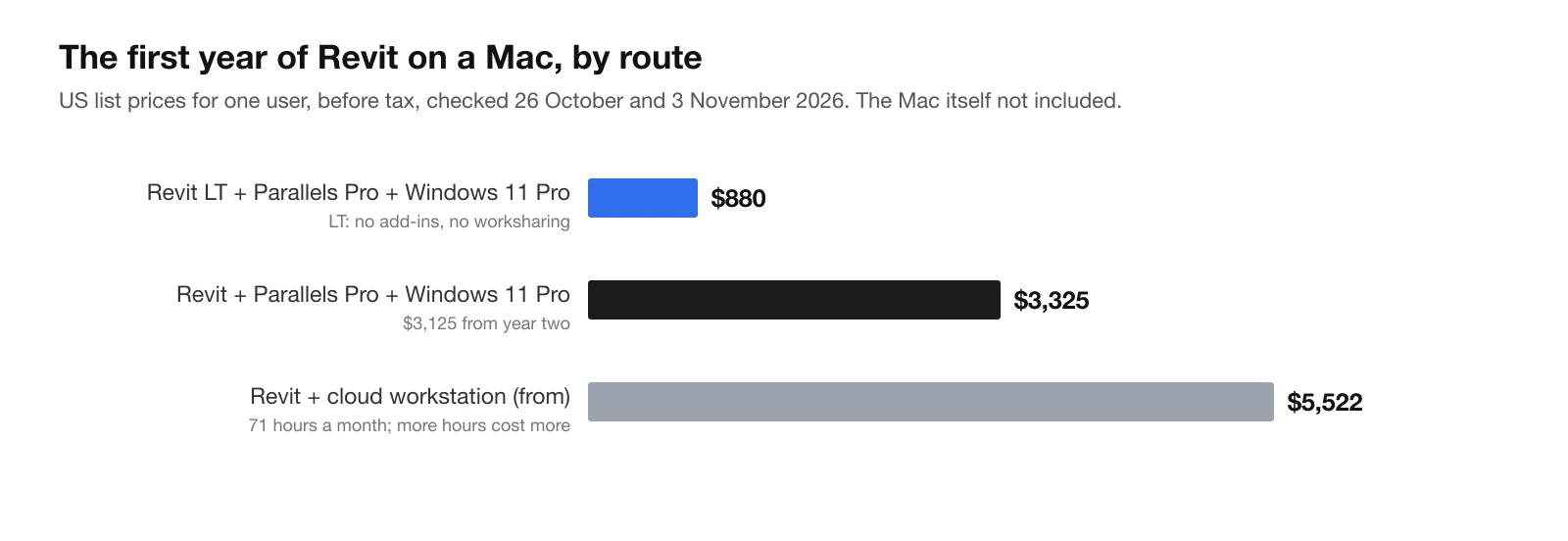
Our calculation from Autodesk's US prices (26 October 2026), Parallels' and Microsoft's list prices (3 November 2026) and Designair's published cloud estimate. The Mac itself is not included.
| Item | Price | Source |
|---|---|---|
| Revit, annual subscription | $3,005 a year | Autodesk US store, see our Revit price guide |
| Revit LT, annual subscription | $560 a year | Autodesk US store |
| Parallels Desktop Pro | $119.99 a year (list) | Parallels |
| Windows 11 Pro | $199.99 once | Microsoft US store |
| Cloud workstation, 71 hours a month | from $209.75 a month | Designair's own estimate |
The virtual machine adds about $320 in the first year and $120 a year after that, roughly a tenth of Revit's own price. The bigger hidden cost is the Mac: if yours has 16 GB, a 32 GB Mac or a cloud workstation is the real price of running Revit on it. Parallels and Microsoft run discounts often; on the day we checked, Parallels' European store showed half price for Black Friday.
Only need to open an RVT file?
If someone sends you a Revit model and you only need to look at it, you do not need Revit or Windows. Autodesk Viewer (viewer.autodesk.com) opens RVT files in the browser, Safari included, with a free Autodesk account. If they can send IFC instead, our free IFC viewer opens it in the browser without uploading the file, and our guide to IFC files explains what survives the export from Revit.
Revit alternatives that run natively on a Mac
If you work alone or choose your own tools, the simplest answer is often not to run Revit at all:
- Archicad (Graphisoft) runs natively on macOS, including Apple silicon, and has long been the usual BIM choice in Mac-based architecture offices.
- Vectorworks Architect runs natively on macOS and Windows.
- BricsCAD BIM runs on macOS, Windows and Linux, with a DWG-based workflow familiar to AutoCAD users.
- AIBIMTool runs in any browser and models the first version of a building from a brief and a site.
All four exchange models with Revit users through IFC, the open BIM format. IFC is not a perfect round trip: walls, slabs, doors, rooms and storeys come across well, while Revit families and parameters arrive as simpler objects. For the full ranking with prices, see the best BIM software in 2026.
Where AIBIMTool fits, and where it does not
AIBIMTool is our product: an online AI BIM tool whose agent runs on Anthropic's Claude. You describe a project in plain language, load the site from the map or attach an RFP, and it models the building as IFC4, with storeys, walls, slabs, doors, stairs, a roof and named rooms. Because it runs in the browser, it works the same on a Mac as on Windows, with no Windows, Parallels or 32 GB of memory needed.
| Revit in Parallels on a Mac | AIBIMTool on a Mac | |
|---|---|---|
| What you install | Parallels, Windows 11, Revit | Nothing, it runs in Safari or Chrome |
| Mac memory Autodesk recommends | 32 GB | Any Mac that runs a modern browser |
| First-year cost | about $3,325 (full Revit) | Free plan; Starter €49 a month billed yearly |
| First model of a building | You model it by hand | The AI agent models it from a brief and a site |
| Construction documents, families, worksharing | Yes | No, early design only |
| File | Native .rvt and IFC | IFC4, which opens in Revit and Archicad |
Where it helps a Mac user: the early design of a project, where you test a brief against a site, and handing a model to colleagues who do have Revit. Where it does not: if your job is construction documents in Revit or your office works in shared .rvt models, you still need Revit, and on a Mac that means one of the routes above.
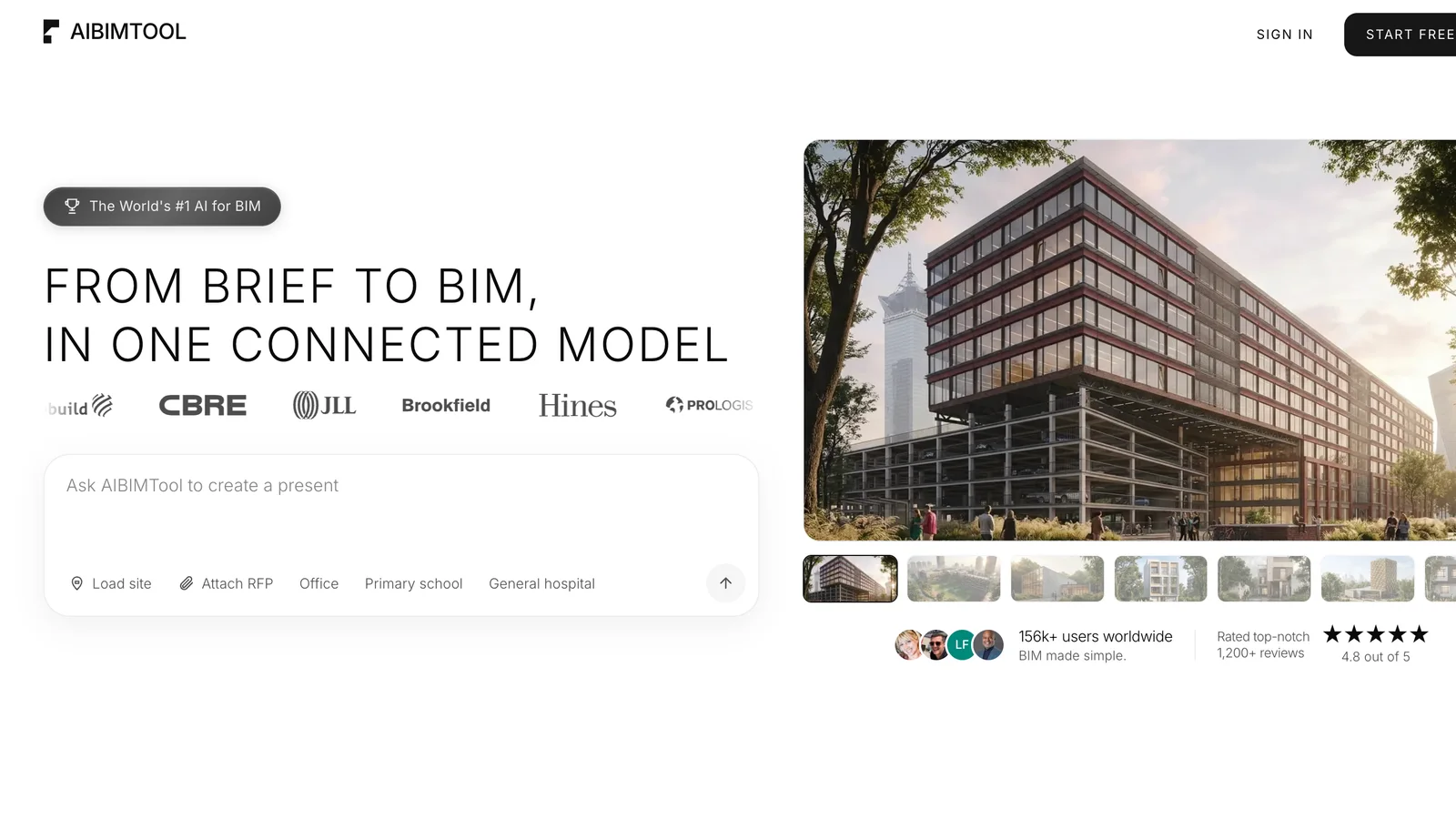
AIBIMTool at aibimtool.com: runs in the browser on a Mac, a brief and a site in, an IFC4 model out.
BIM on your Mac without Windows
- Runs in the browser, on Apple silicon and Intel Macs alike.
- Brief and site in, IFC4 out, ready to open in Revit or Archicad.
- Free plan with one AI generation and the IFC download.
Our verdict: should you run Revit on a Mac?
Yes, if you have an Apple silicon Mac with 32 GB or more and your projects are small to mid-size: Parallels Desktop Pro with Windows 11 is Autodesk's own recommended route and adds about $320 to the first year. Use a cloud workstation if your Mac has 16 GB, your models are large or you render inside Revit. Use Boot Camp only on an Intel Mac you already own, for older Revit versions. And if you only need Revit because others use it, consider a native Mac BIM tool or AIBIMTool and exchange IFC, rather than paying for Revit, Windows and a virtual machine.
How we made this guide
On 3 November 2026 we read, and took screenshots of, Autodesk's "System requirements for Revit 2027 products" (including its configuration for Apple computers), Parallels' Desktop buy and edition comparison page and its FAQ, Apple's Boot Camp support article, and Microsoft's US store page for Windows 11 Pro. We hid cookie bars and chat buttons and changed nothing else. Revit prices are from Autodesk's US store on 26 October 2026, as in our Revit price guide. Parallels' store showed euro prices from our location, with a Black Friday discount; the $119.99 figure is Parallels' US list price for Pro. Cloud workstation costs are Designair's own published estimate, and Designair sells that service.
We did not install Revit in Parallels for this article, so we report Autodesk's and Parallels' statements about performance rather than our own benchmarks. The first-year costs are our own arithmetic. Search volumes come from Ahrefs Keywords Explorer (US, November 2026): "revit for mac" about 600 searches a month, "revit mac" and "revit on mac" 200 each, "does revit work on mac" 150. We make AIBIMTool, and we listed what it does not replace as plainly as what it does.
Sources
- Autodesk, System requirements for Revit 2027 products, including the recommended configuration for Apple computers.
- Autodesk Revit Ideas, "Revit for Mac": the request thread where the Revit team's position on a native Mac version is discussed.
- Parallels, Buy Parallels Desktop: editions, vRAM and vCPU limits, subscription terms and Intel Mac support.
- Parallels, Revit for Mac with Parallels Desktop: Windows 11 on Arm, add-in caveats and performance.
- Apple, Install Windows 10 on your Mac with Boot Camp Assistant.
- Microsoft Store, Windows 11 Pro.
- Designair, Revit for Mac: What Actually Works in 2026: cloud workstation prices (a vendor's own comparison).
- Autodesk Viewer: view RVT and other design files in the browser.
Frequently asked questions
Is there a Revit for Mac?
No. Revit runs only on 64-bit Windows; Revit 2027 lists Windows 11 as its only operating system. Autodesk's Revit team has said it is not planning a native Mac version, because rebuilding Revit for macOS would take resources away from the Windows product. On a Mac you run Revit inside Windows: in Parallels Desktop, on a cloud or office PC you connect to, or, on an older Intel Mac, with Boot Camp.
Does Revit work on M1, M2, M3 or M4 Macs?
Yes, inside Windows 11 in Parallels Desktop. Autodesk's Revit 2027 system requirements include a recommended configuration for Apple computers that names Parallels Desktop for Mac, accepts any Apple silicon chip, and asks for 32 GB of memory on the Mac, 16 GB for the Windows virtual machine and at least 4 GB of video memory. Autodesk also says Accelerated Graphics is not supported in Parallels and that Revit's hardware acceleration option should be off.
Which Parallels edition do I need for Revit?
Pro (or Business). Parallels Desktop Standard limits each virtual machine to 8 GB of RAM and 4 virtual CPUs, while Autodesk recommends 16 GB for the Windows virtual machine that runs Revit. Pro allows up to 128 GB and 32 virtual CPUs. Pro's list price is $119.99 a year; it is sold only as a subscription.
Can I use Boot Camp for Revit?
Only on an Intel Mac, and only for older Revit versions in practice. Apple's Boot Camp works on Intel Macs from 2012 to 2020 and Apple's instructions cover Windows 10. Revit 2027 lists Windows 11 only, and Microsoft ended support for Windows 10 on 14 October 2025. Apple silicon Macs cannot run Boot Camp at all.
How much does it cost to run Revit on a Mac?
With US list prices, the first year of full Revit in Parallels costs about $3,325: $3,005 for Revit, $119.99 for Parallels Desktop Pro and $199.99 for Windows 11 Pro, then about $3,125 a year after that. With Revit LT instead of Revit it is about $880. A rented cloud workstation adds roughly $2,500 or more a year on top of Revit, depending on hours. The Mac needs 32 GB of memory to match Autodesk's recommendation.
Is a 16 GB MacBook enough for Revit?
Below what Autodesk recommends. Autodesk's configuration for Apple computers asks for 32 GB on the Mac so that 16 GB can go to Windows. On a 16 GB Mac you could give Windows about 8 GB, which is half of Autodesk's figure for a model of about 300 MB. Expect it to work for learning and small models and to struggle with real projects. A cloud workstation is the better route on a 16 GB Mac.
What are the best Revit alternatives that run natively on a Mac?
Archicad, Vectorworks Architect and BricsCAD BIM all run natively on macOS and exchange models with Revit users through IFC. For the first model of a project, AIBIMTool runs in any browser, including Safari on a Mac, and turns a written brief and a site into an IFC4 model that opens in Revit. To only look at a Revit file, Autodesk Viewer opens RVT files in the browser.







How to Connect Claude to Revit: The 3 Revit MCP Servers, Set Up Step by Step
Connect Claude to Autodesk Revit with MCP: Autodesk's official Revit 2027 server, the open-source mcp-servers-for-revit for Revit 2020 to 2026, and the pyRevit route, with exact configs, prompts and pitfalls. Plus the no-setup alternative: AIBIMTool, Claude-powered BIM modelling online with a free plan.
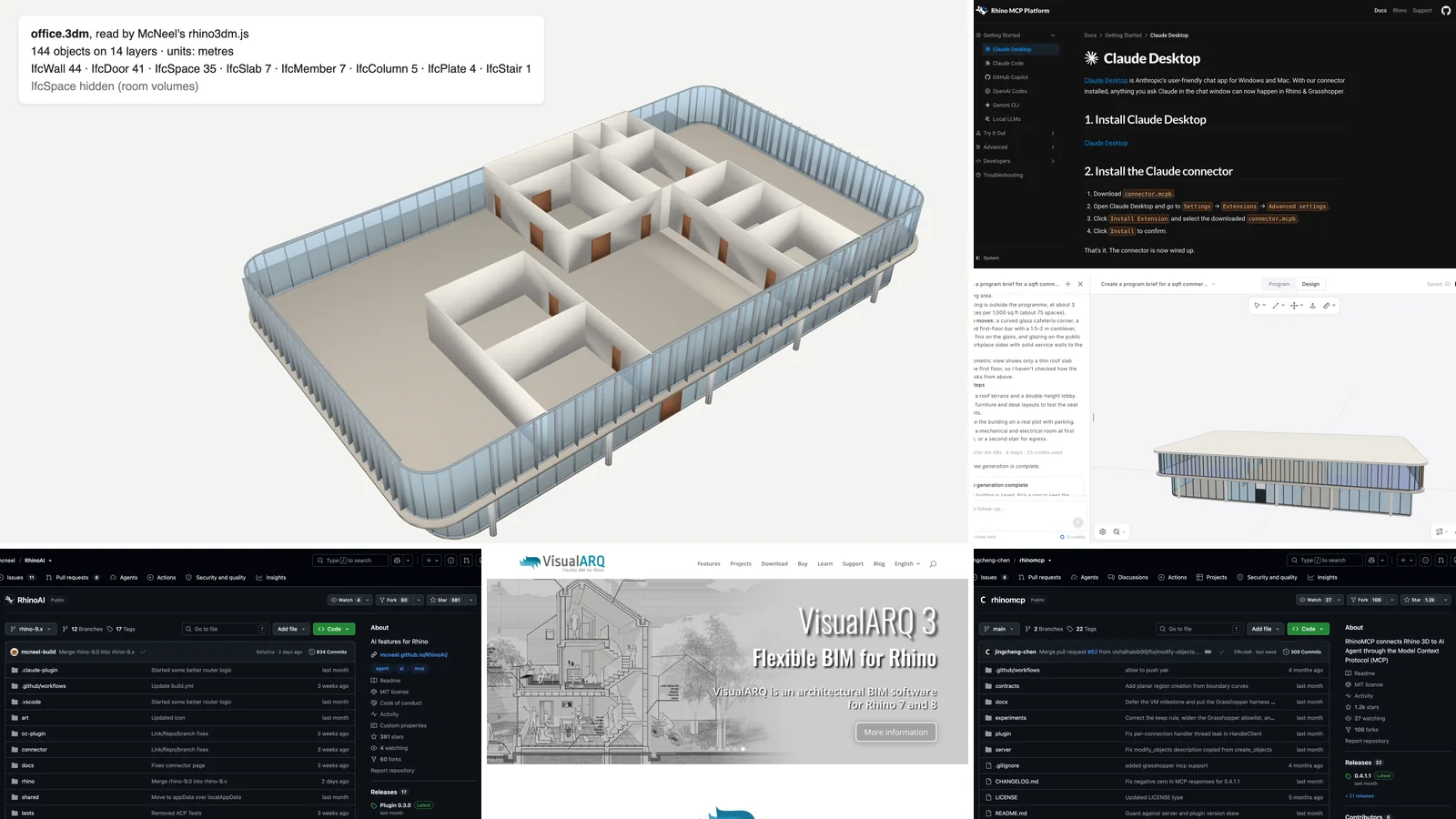
How to Connect Claude to Rhino for BIM: Rhino MCP, Grasshopper and IFC
Connect Claude to Rhino with McNeel's official Rhino MCP Platform or rhinomcp, step by step, then get a real BIM model into Rhino: VisualARQ, a free IFC-to-3dm script we tested on an AIBIMTool building, and prompts for BIM work in Rhino and Grasshopper.
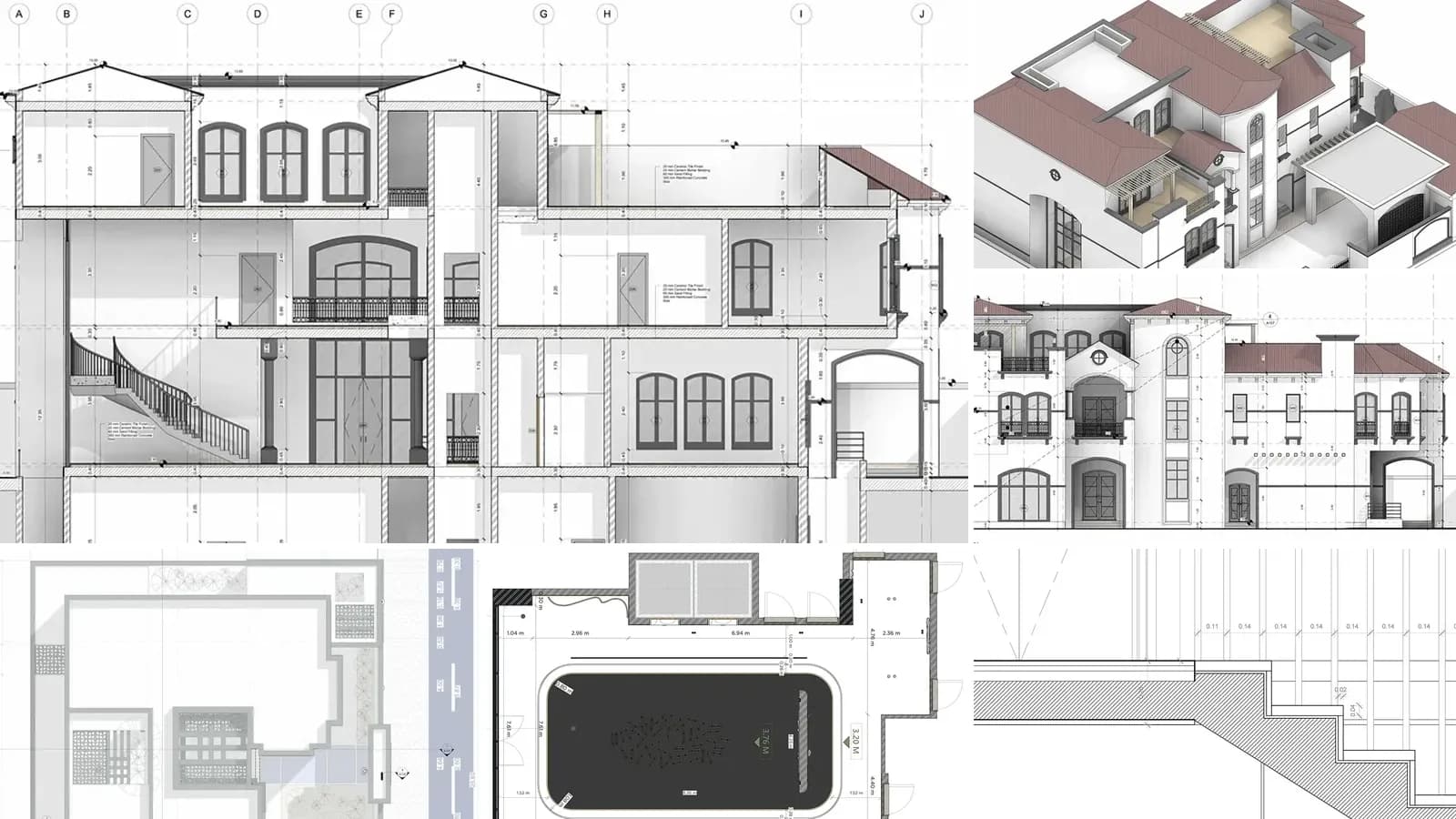
Architectural Drawings: 12 Types, Scales and How to Read Them
What architectural drawings are, the 12 types in a full drawing set with real examples, US scales, sheet numbers like A-101, the drawings each project phase produces and how to read them.