
RFA File: What It Is, How to Open One Without Revit, and RFA vs RVT, RTE and RFT


An RFA file is a Revit family: one building component, such as a door, a chair, a light fixture or a title block, saved on its own so it can be loaded into any Revit project. It holds the component's 3D geometry, its 2D symbols, its parameters and its types. RFA files open in Autodesk Revit and Revit LT, and Revit projects (RVT) are built from many of them.
Our articles are still written by humans!
Get human written articles in your Google feed.
This guide explains what is inside an RFA file and how it differs from RVT, RTE and RFT. It covers how to open one without Revit, and why a family from a colleague's newer Revit refuses to open in yours. It includes a free Revit file inspector. It also covers what we found when we read 553 Revit files that people have published on GitHub. Most of those files still hold the Windows user folder of whoever saved them.
Free Revit file inspector
Drop one or more .rvt, .rfa, .rte or .rft files, or a whole folder of families. For each file it shows the Revit release and build that saved it and which Revit versions can open it. It also shows the thumbnail Revit stored inside, worksharing, linked files and the language Revit was set to. For families it adds the category, the types and every type parameter with its value. The list and the types download as CSV. Nothing is uploaded: the files are read in your browser.
What it does not do: show the model in 3D or change the file. Revit keeps the geometry and elements in compressed, undocumented streams. The inspector reads only the parts Revit writes in plain text or XML, which are described below. For a 3D view, see how to open an RFA without Revit.
What an RFA file is
Revit sorts everything in a model into families. There are three kinds, and only one of them lives in RFA files:
- System families are walls, floors, roofs, ceilings, stairs and similar elements. Their types live inside the project and cannot be saved as separate files. You copy them between projects with Transfer Project Standards.
- Loadable families are doors, windows, furniture, plumbing fixtures, lighting, structural columns, annotation tags, title blocks and so on. Each one is an RFA file, built in the Family Editor and loaded into projects.
- In-place families are one-off elements modeled inside a project, such as an unusual reception desk. They stay in that project.
An RFA file holds one family. A family can have several types, which are sizes or variants, for example a door family with 30" x 80" and 36" x 84" types. Each type sets values for the family's type parameters (width, height, material, manufacturer, model). Once loaded, every instance placed in the project follows its type.
Revit and Revit LT can both open and edit RFA files in the Family Editor. RFA files are also what manufacturers publish on BIMobject, BIMsmith and their own sites. Autodesk installs its own library with Revit, under C:\ProgramData\Autodesk\RVT 20xx\Libraries\ (the release year replaces xx). Some of the files in our test still point their keynote table to that folder on the machine that saved them.
RFA vs RVT, RTE and RFT, and the other Revit files
| Extension | What it is | Opens in | Typical size in our test |
|---|---|---|---|
| .rvt | Project: a whole building model with views, sheets and schedules | Revit, Revit LT | median 3.3 MB; production models often run to hundreds of MB |
| .rfa | Family: one loadable component | Revit, Revit LT | median 0.5 MB |
| .rte | Project template: the starting point for new projects (settings, view templates, loaded families) | Revit, Revit LT | not in our sample |
| .rft | Family template: the starting point for a new family of one category (Door, Furniture, Generic Model…) | Revit, Revit LT | median 0.4 MB |
| .0001.rvt, .0002.rfa… | Automatic backups, one per save, in the same folder | Revit, like the original | same as the original |
| .txt journals | A log of every Revit session, used by Autodesk support | any text editor | small |
Backups are named with the model name and a four-digit save count. By default Revit keeps 3 for a non-workshared file and 20 for a workshared one, per Autodesk's About Backup Files. Workshared central models keep their backups in a folder next to the model instead. The UK National Archives lists the Revit formats in its PRONOM file format registry (RFA), which is a neutral reference if you need one for an archive or a contract.
How to open an RFA or RVT file without Revit
| Option | What you get | Cost | Catch |
|---|---|---|---|
| Our Revit file inspector (above) | Version, thumbnail, category, types and type parameters, linked files | Free, no account | No 3D, no editing |
| Autodesk Viewer | 3D and 2D views, measure, markup | Free | Needs an Autodesk account, and the file is uploaded to Autodesk's cloud |
| Revit in viewer mode | The full Revit interface, every view and property | Free, but Revit must be installed | Cannot save, or export or print anything you change (Autodesk) |
| Revit or Revit LT trial | Everything, including saving | Free for the trial period | Windows only, large install, the trial ends |
| Ask for an IFC or DWG | A file any BIM or CAD tool opens | Free | Someone with Revit has to export it |
If what you actually need is the model in another program, the open route is IFC. A Revit user exports IFC from the project, and you open it in any BIM tool or in our free IFC viewer, or turn it into AutoCAD plans with the IFC to DWG converter. Our guide to IFC files explains what survives that trip. AutoCAD cannot open RFA or RVT at all, and no free converter turns an RFA into DWG, SketchUp or IFC without Revit doing the export.
Why a newer Revit file will not open in your Revit
Revit opens files from older releases and upgrades them. It cannot go the other way. A family saved in Revit 2026 does not open in Revit 2025, and there is no Save As Older Version. Autodesk states this in its article on backward compatibility. Its workaround is to export from the newer release to IFC or DWG, which loses the family's parameters and editability.
Two habits follow from that:
- Check the version before you upgrade a library. Opening a family in a newer Revit and saving it makes it unusable for anyone still on the older release. Drop the library folder into the inspector to see the spread, and keep the oldest version you still support as the master copy.
- Download families in the oldest version offered. Manufacturers often publish one file per release. The oldest one opens everywhere you work, and Revit upgrades it when you load it.
The file records the release in plain text. Files from Revit 2019 and later write Format: 2026 and Build: 20250328_1515(x64). Files from Revit 2018 and earlier write Revit Build: Autodesk Revit 2017 (Build: 20160220_1500(x64)). The build date tells you which update of that release saved the file.
What is inside an RFA file
An RFA or RVT file is a Microsoft Compound File, the same container old .doc and .xls files used: a small file system with named streams inside one file. Most streams (Global, Partitions, ElemTable, Latest) hold the model in Revit's compressed, undocumented format. A few are readable, and they are what the inspector shows:
- BasicFileInfo: the release and build that saved the file, worksharing status, central model path, the full path the file was last saved to, the language of Revit, and a document GUID. It is UTF-16 text after a short binary header.
- PartAtom (families and templates): an XML catalog entry in Atom format with the family name, its category, the Revit version, a list of family settings, and every type with its type parameters. Each parameter records its data type (Length, Material, Yes/No…) and whether it is a system, family or shared parameter. Revit writes it so content catalogs can index a family without opening it.
- RevitPreview4.0: the thumbnail shown in Revit's Open dialog, a PNG after a short header.
- TransmissionData: XML listing external files the model references, such as the keynote table, the assembly code table, linked Revit models, CAD links and decal images, with their last saved paths.
Category names in PartAtom are stored in the language of the Revit that saved the file, not in English. In our test, Chinese installations filed furniture under 家具 and German ones filed masses under Körper. A script that sorts a family library by category has to map those names.
What we found in 553 Revit files on GitHub
To see what real Revit files carry, we searched GitHub for public repositories with Revit files. That gave 30 repositories: Dynamo and pyRevit packages, Revit API samples, family libraries and test suites. We read every .rvt, .rfa, .rte and .rft in them with the inspector's code. After removing duplicates, that is 553 files: 241 projects, 280 families and 32 family templates, saved between Revit 2011 and Revit 2027. The per-file results are in this CSV, without paths or user names.
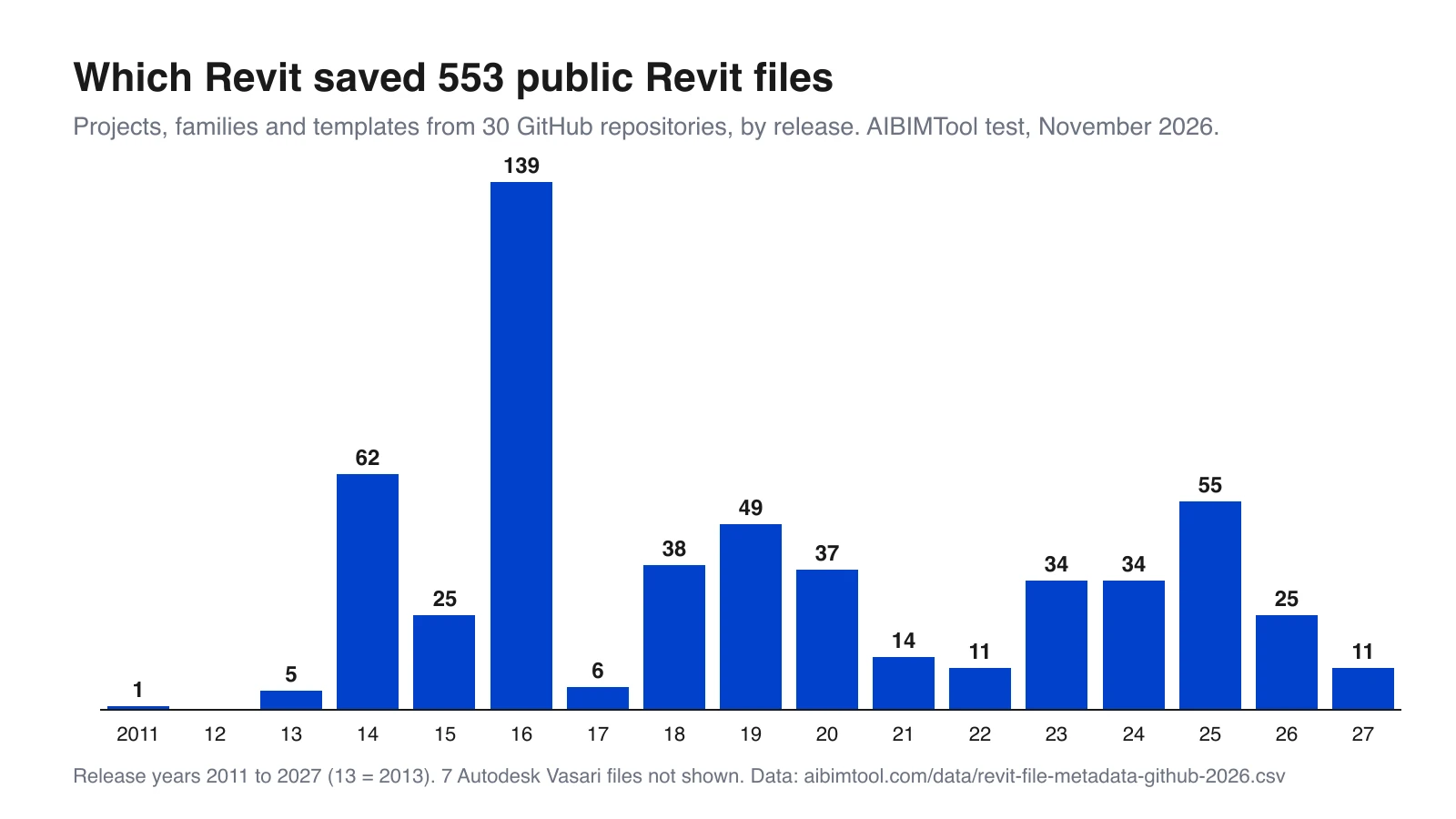 Which Revit saved the 553 files. Our test, November 2026.
What stood out:
- 79 percent of the files store a Windows user name. In 436 of the 553 files, the "last saved to" path runs through
C:\Users\<name>\, which gives away the account name of the person who saved it and often a client or project folder. That includes 226 of 280 families. Revit replaces the path on every save, so a family library meant for sharing should be saved one last time from a neutral folder such asC:\Families\. Of the 553 files, 62 had the same kind of path in their linked-file list. - Old files are everywhere. 232 of the files were last saved in Revit 2016 or earlier, and 111 of them are families. Anyone on a current release can open them, but nobody on those old releases can open the 91 files saved in 2025 or later.
- Most families have one type. 243 of 280 families had a single type. Only 37 had two or more, and only 31 used a shared parameter in their first type. Shared parameters are the ones that schedule and tag consistently across families.
- Thumbnails are small. 528 files had a thumbnail, and every one was 128 x 128 pixels, projects included. That is why Revit's Open dialog previews look blurry.
- Hardly any were workshared. Only 3 files were workshared, 2 local copies and 1 central model. Teams keep their live projects off public GitHub, so this test says nothing about production models.
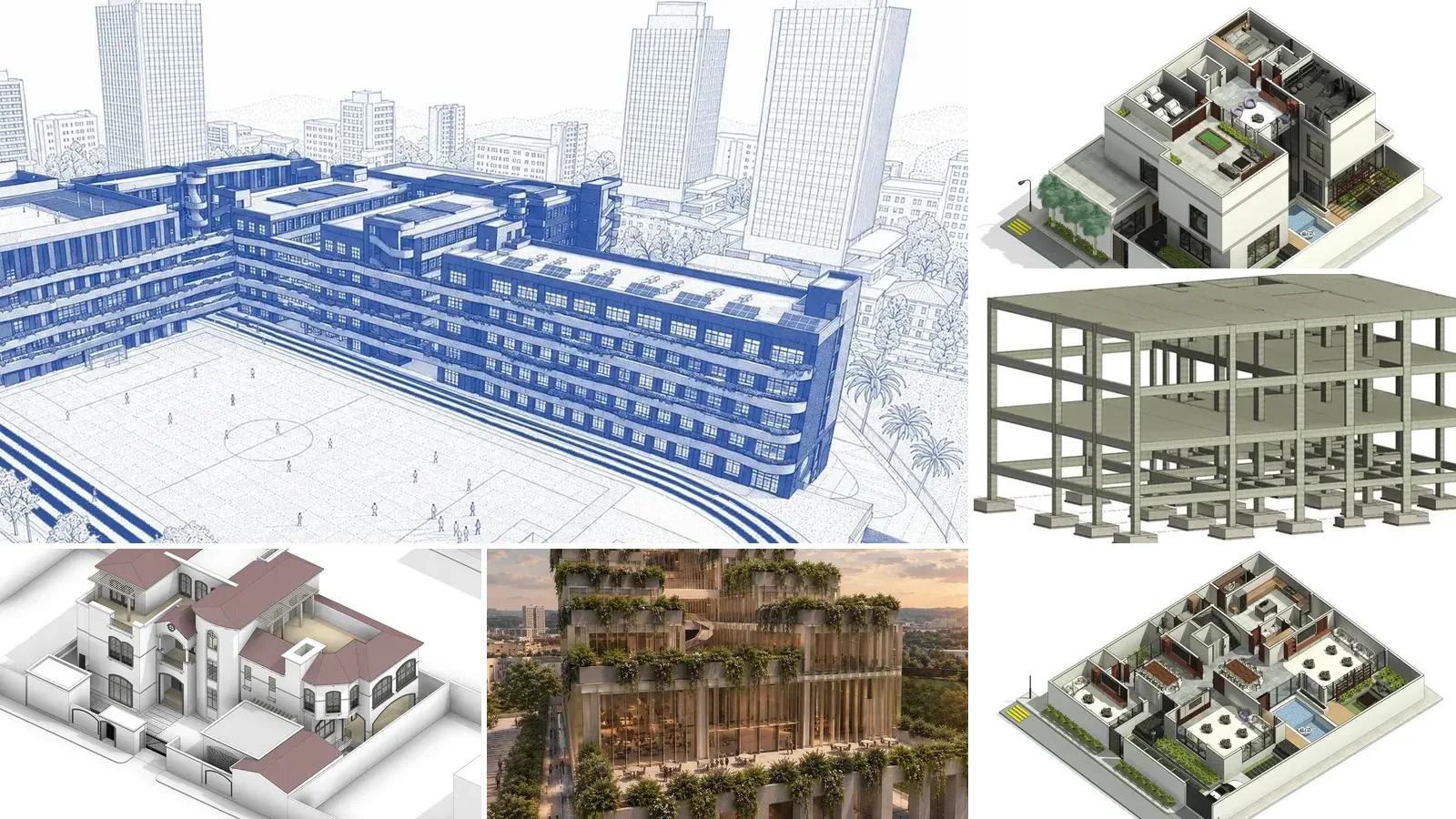
The cover image is made of thumbnails from files in the repositories under MIT, Apache 2.0 or BSD licenses. The sample in the inspector is "Chair 1.rfa" from Gavin Crump's Crumple toolkit, used under its MIT license. It is a Revit 2026 furniture family with three types and two material parameters.
Where to get RFA families
- Manufacturers' sites and BIMobject, BIMsmith or ARCAT for real products, with the right dimensions and data. Check the version list before downloading.
- Autodesk's library, installed with Revit and downloadable per release from Revit's Load Autodesk Family dialog.
- Your office library, which is where most families come from in practice. Run the inspector over it once a year to see which release it is stuck in.
Our own free 3D models are IFC, FBX, OBJ and GLB files, not RFA. They work in Revit through IFC link or import, and in any other BIM tool, but they are not parametric families. If you want a family's data to travel to other software, the same holds as for whole models: export IFC. For BIM work that has to read the file without Revit, see the IFC editor and the NWD file guide.
Frequently asked questions
What is an RFA file?
An RFA file is a Revit family: one loadable building component, such as a door, a chair, a light fixture or a title block, saved on its own so it can be loaded into any Revit project. It holds the component's geometry, its parameters and its types (for example a door family with 30 x 80 and 36 x 84 inch types). It opens in Autodesk Revit and Revit LT.
How do I open an RFA file without Revit?
To see it in 3D, upload it to Autodesk Viewer (free, needs an Autodesk account) or run Revit in viewer mode, which is free but cannot save. To see what the file is without uploading it, our free Revit file inspector reads the Revit version, thumbnail, category, types and type parameters in your browser. No free tool converts an RFA to another format without Revit.
Can AutoCAD open RFA files?
No. AutoCAD cannot open or import RFA or RVT files. Someone with Revit has to open the family and export it to DWG, or you can look for the same product as a DWG block from the manufacturer.
What is the difference between RVT and RFA?
RVT is a Revit project: a whole building model with its views, sheets and schedules. RFA is a single family, one component that gets loaded into projects. A project contains copies of many families; the RFA files are the separate originals. RTE and RFT are the templates new projects and new families start from.
Can I open a newer Revit file in an older version of Revit?
No. Revit opens files from older releases and upgrades them, but it cannot open files saved by a newer release, and there is no save-as-older-version option. Autodesk's suggested workaround is to export the model from the newer Revit to IFC or DWG and open that in the older version.
How can I tell which Revit version a file was saved in?
Every RVT and RFA file stores the release and build that last saved it in an internal stream called BasicFileInfo. Our free inspector reads it in the browser for one file or a whole folder. Inside Revit, opening a file from an older release shows an upgrade message.







What Is an IFC File? How to Open, Edit and Check One
An IFC file is the open BIM format defined in ISO 16739. What is inside one, free ways to open and edit it, and the export mistakes we found in our own files.
NWD File: What It Is, How to Open It Free, and NWD vs NWC vs NWF
An NWD file is a published Navisworks model: the geometry of every appended model plus viewpoints, clashes and redlines in one compact file. How to open it for free on Windows, on a Mac and in Revit, how it differs from NWC and NWF, why it will not open, and why you cannot turn it into IFC. Checked on Autodesk's own pages.
Revit Price 2026: What Revit Really Costs in the US, UK and EU
Revit costs $3,005 a year or $380 a month in the US, €3,106 in Germany and £2,712 in the UK. Revit LT is $560 and the AutoCAD Revit LT Suite $680. Every Revit, LT, AEC Collection and Flex price checked on Autodesk's own stores, plus which plan is cheaper for how you work.